```
#### Update the Nessus 主程式
##### Offline
1. 下載最新版 Nessus : [Download Nessus | Tenable®](https://www.tenable.com/downloads/nessus?loginAttempted=true)
NOTE: 如果舊版的是用 RPM 安裝,升級時也必須用 RPM 升級。
2. 將更新檔上傳至 Nessus 主機,並進行更新作業。
以 RPM 方式更新
```bash
rpm -Uvh Nessus-10.4.1-es8.x86_64.rpm
systemctl stop nessusd
systemctl start nessusd
```
##### Online
```bash
/opt/nessus/sbin/nessuscli update
```
##### 檢查目前版號
Nessus Admin > Settings > About
#### Update the plugins
##### Online
```bash
/opt/nessus/sbin/nessuscli update --plugins-only
```
##### Offline
- [Install Nessus and Plugins Offline (with pictures) - InfosecMatter](https://www.infosecmatter.com/install-nessus-and-plugins-offline-tutorial-with-pictures/)
- [Offline Update Page Details (Nessus) (tenable.com)](https://docs.tenable.com/nessus/Content/OfflineUpdatePageDetails.htm)
- [Install Plugins Manually (Nessus) (tenable.com)](https://docs.tenable.com/nessus/Content/InstallPluginsManually.htm)
For 免費版授權
> NOTE: 原有的 activation code 已經註冊過,就不能重複取得 plugin 的下載連結。必須重新申請一組新的 activation code,再依據下方程序取得最新 plugin 下載連結。
1. 申請一組新的 [Activation Code](https://www.tenable.com/products/nessus/activation-code) (NOTE: 只有使用這個連結,才可以立即收到郵件通知)
2. 從現有 Nessus 主機取得 Challenge Code
3. 用上述的資料透過下述的連結,可以下載最新的 plugin 更新檔,前往: [https://plugins.nessus.org/v2/offline.php](https://plugins.nessus.org/v2/offline.php) (TIP: 網頁除了提供 plugin 更新檔 `all-2.0.tar.gz` 以外,還有授權檔的資訊,不過在這個案例用不上)
取得 Challenge Code (NOTE: 每次重啟系統,Challenge Code 會被重置)
```bash
/opt/nessus/sbin/nessuscli fetch --challenge
```
將 plugin 更新檔上傳至主機並套用
```bash
/opt/nessus/sbin/nessuscli update all-2.0.tar.gz
```
確認 plugin 已更新
Nessus Admin > Settings > About
- Last Updated: 更新的時間
- Plugin Set: 更新後的版本
- Policy Template version: 更新後的版本
注意事項:
1. 套用更新檔指令完成後,系統還需要數分鐘時間進行背景更新作業,可以觀察 CPU 的負載程度來確認是否已完成。
2. 舊的 scan 不會套用新的 plugin,必須先移除再重新建立才會套用。
#### 重新註冊授權
用新的授權檔重新註冊
- [Generating the Custom URL for downloading plugins for an Offline Nessus Installation (tenable.com)](https://community.tenable.com/s/article/Generating-the-Custom-URL-for-downloading-plugins-for-an-Offline-Nessus-Installation)
- [Manage Nessus Offline (Nessus) (tenable.com)](https://docs.tenable.com/nessus/Content/ManageNessusOffline.htm)
#### FAQ
##### 更新 plugin 出現錯誤
> Error: failed to write decompressed tar archive \* Failed to update from all-2.0.new.tar.gz. Invalid manifest.
解決方案:檢查目錄 `/opt/nessus` 是否有足夠可用空間。
##### 修正 plugin #51192(SSL Certificate Cannot Be Trusted)
對於使用自我簽署憑證的網站或服務,可以使用 custom\_CA 功能,將自訂的根憑證,輸入至 Nessus 系統。
> TIP: 根憑證必須是 PEM 格式 BAS64 編碼,內容包含開頭文字 `-----BEGIN CERTIFICATE-----`,與結尾文字 `-----END CERTIFICATE-----` 的密文內容。
Nessus Web > Settings > Custom CA
```
-----BEGIN CERTIFICATE-----
...
...
...
-----END CERTIFICATE-----
```
##### Log4Shell 誤警報事件
Nessus 的檢測報告裡,許多各式主機或連網裝置,只要有開啟 HTTP 或 HTTPS 網頁介面,都會出現 Plugin [156014](https://www.tenable.com/plugins/nessus/156014) 與 [156016](https://www.tenable.com/plugins/nessus/156016) 的 Log4Shell 漏洞資訊。
這兩個 Plugin 使用了回測 (Callback)的偵測技術,所以 Scanner (Nessus server) 與 Target (Being scanned hosts) 都需要能連外網的 Tenable Controlled Server。
一般企業裡的網路是限制外網存取的,所以會造成系統誤判的情況。
官方文件指引:[Overview of Callbacks in Log4j Remote Detection Plugins The... | Tenable Connect](https://connect.tenable.com/discussions/tenable-research-release-highlights/overview-of-callbacks-in-log4j-remote-detection-plugins-the-/108463)
Nessus 有兩種不同版本,雲端版 ([Tenable.io](http://tenable.io/))與自行託管的地端版。Log4Shell 有兩個無需認證的檢測 Plugin。
1. Plugin [156014](https://www.tenable.com/plugins/nessus/156014) : 地端主機與被掃描主機需要外網存取,僅適用雲端版
2. Plugin [155998](https://www.tenable.com/plugins/nessus/155998) : 雲端主機需要可以存取內部被掃描的主機,僅適用地端版
不適用的 Plugin 可以從管理介面將它排除。
# Learning
#### Threat Intelligence
Detection & Analysis Tools
- [VirusTotal](https://www.virustotal.com/gui/home) is a service that allows anyone to analyze suspicious files, domains, URLs, and IP addresses for malicious content. VirusTotal also offers additional services and tools for enterprise use.
- [Jotti's malware scan](https://virusscan.jotti.org/) is a free service that lets you scan suspicious files with several antivirus programs. There are some limitations to the number of files that you can submit.
- [Urlscan.io](https://urlscan.io/) is a free service that scans and analyzes URLs and provides a detailed report summarizing the URL information.
- [MalwareBazaar](https://bazaar.abuse.ch/browse/) is a free repository for malware samples. Malware samples are a great source of threat intelligence that can be used for research purposes.
- [OpenCTI](https://github.com/OpenCTI-Platform/opencti) is an open source platform allowing organizations to manage their cyber threat intelligence knowledge and observables.
#### Resources
- [Awesome Cybersecurity Handbooks](https://github.com/0xsyr0/Awesome-Cybersecurity-Handbooks)
#### Security Jobs
##### Interview
- This [blog](https://allthingspwned.com/) offers lots of helpful tips, information, and practice scenarios on preparing for technical interviews in the cybersecurity field.
#### Glossary
- [Google-Cybersecurity-Certificate-glossary.docx](https://osslab.tw/attachments/91)
# Security Websites
##### CVE Database
- [https://www.cve.org/](https://www.cve.org/) (Formerly: https://cve.mitre.org)
- [https://nvd.nist.gov/](https://nvd.nist.gov/) (美國漏洞資料庫)
- [https://euvd.enisa.europa.eu/](https://euvd.enisa.europa.eu/) (歐盟漏洞資料庫)
- [https://www.twcert.org.tw/tw/lp-132-1.html](https://www.twcert.org.tw/tw/lp-132-1.html) (台灣漏洞揭露平台)
- [https://www.cvedetails.com/](https://www.cvedetails.com/)
- [https://www.kb.cert.org/vuls/](https://www.kb.cert.org/vuls/) (CERT/CC Vulnerability Notes Database)
##### Vendor
- RedHat: [https://access.redhat.com/security](https://access.redhat.com/security)
- iThome: [https://www.ithome.com.tw/security](https://www.ithome.com.tw/security)
- HPE: [https://support.hpe.com/hpesc/public/docDisplay?docId=sd00001284en\_us](https://support.hpe.com/hpesc/public/docDisplay?docId=sd00001284en_us)
- IBM: [https://www.ibm.com/trust/security-psirt](https://www.ibm.com/trust/security-psirt)
- VMware: [https://www.broadcom.com/support/vmware-security-advisories](https://www.broadcom.com/support/vmware-security-advisories)
- Cisco: [https://sec.cloudapps.cisco.com/security/center/publicationListing.x](https://sec.cloudapps.cisco.com/security/center/publicationListing.x)
- HCL Notes: [https://support.hcltechsw.com/csm?id=community\_topic&sys\_id=d1514ac91be8cc5c83cb86e9cd4bcba8](https://support.hcltechsw.com/csm?id=community_topic&sys_id=d1514ac91be8cc5c83cb86e9cd4bcba8)
- Ubuntu: [https://ubuntu.com/security/cves](https://ubuntu.com/security/cves)
- Debian: [https://security-tracker.debian.org/tracker/](https://security-tracker.debian.org/tracker/)
- Microsoft: [https://msrc.microsoft.com/update-guide/vulnerability](https://msrc.microsoft.com/update-guide/vulnerability)
- Apple: [https://support.apple.com/en-us/HT201222](https://support.apple.com/en-us/HT201222)
- Google Cloud: [https://cloud.google.com/support/bulletins](https://cloud.google.com/support/bulletins)
##### Government
- [台灣電腦網路危機處理暨協調中心 TWCERT/CC](https://www.twcert.org.tw/tw/mp-1.html)
- [台灣漏洞揭露平台 (TVN)](https://www.twcert.org.tw/tw/np-131-1.html)
- [惡意檔案檢測服務 Virus Check](https://viruscheck.tw/)
- [國家資通安全通報應變網站](https://www.ncert.nat.gov.tw/)
- [台灣證交所公開資訊觀測站(一)](https://mops.twse.com.tw/mops/web/ezsearch)
- [台灣證交所公開資訊觀測站(二)](https://mops.twse.com.tw/mops/web/t05sr01_1)
- [資通安全署 Administration for Cyber Security, moda](https://moda.gov.tw/ACS/)
- [國家資通安全研究院](https://www.nics.nat.gov.tw/)
- [US. CISA](https://www.cisa.gov/known-exploited-vulnerabilities-catalog)
- [US. NIST National Vulnerability Database](https://nvd.nist.gov/)
- [CERT-EU](https://cert.europa.eu/publications/security-advisories/)
##### Security Organization
- [HelpNetSecurity](https://www.helpnetsecurity.com/)
- [BleepingComputer](https://www.bleepingcomputer.com/)
- [No More Ransom](https://www.nomoreransom.org/zht_Hant/index.html)
- [Cyberattacks & Data Breaches recent news | Dark Reading](https://www.darkreading.com/cyberattacks-data-breaches)
- [CSO Online](https://www.csoonline.com/)
- [Krebs on Security](https://krebsonsecurity.com/)
##### Security Online Tools
- [URL and website scanner - urlscan.io](https://urlscan.io/)
- [VirusTotal - Home](https://www.virustotal.com/gui/home/upload)
- [AbuseIPDB - IP address abuse reports - Making the Internet safer, one IP at a time](https://www.abuseipdb.com/)
- [Cisco Talos Intelligence Group - Comprehensive Threat Intelligence](https://www.talosintelligence.com/)
- [IBM X-Force Exchange](https://exchange.xforce.ibmcloud.com/)
- [Palo Alto Networks URL filtering - Test A Site](https://urlfiltering.paloaltonetworks.com/)
- [Symantec Sitereview](https://sitereview.bluecoat.com/#/)
- [IP Address Tools, Network Tools, DNS Tools | IPVoid](https://www.ipvoid.com/)
- [Check if a Website is Malicious/Scam or Safe/Legit | URLVoid](https://www.urlvoid.com/)
- [Web Check](https://web-check.xyz/)
NCHC 國網中心
- [Malware Knowledge Base (nchc.org.tw)](https://owl.nchc.org.tw/index.php)
- [雲端資安攻防平臺](https://cdx.nchc.org.tw/index.php)
# Cyber Attacks
[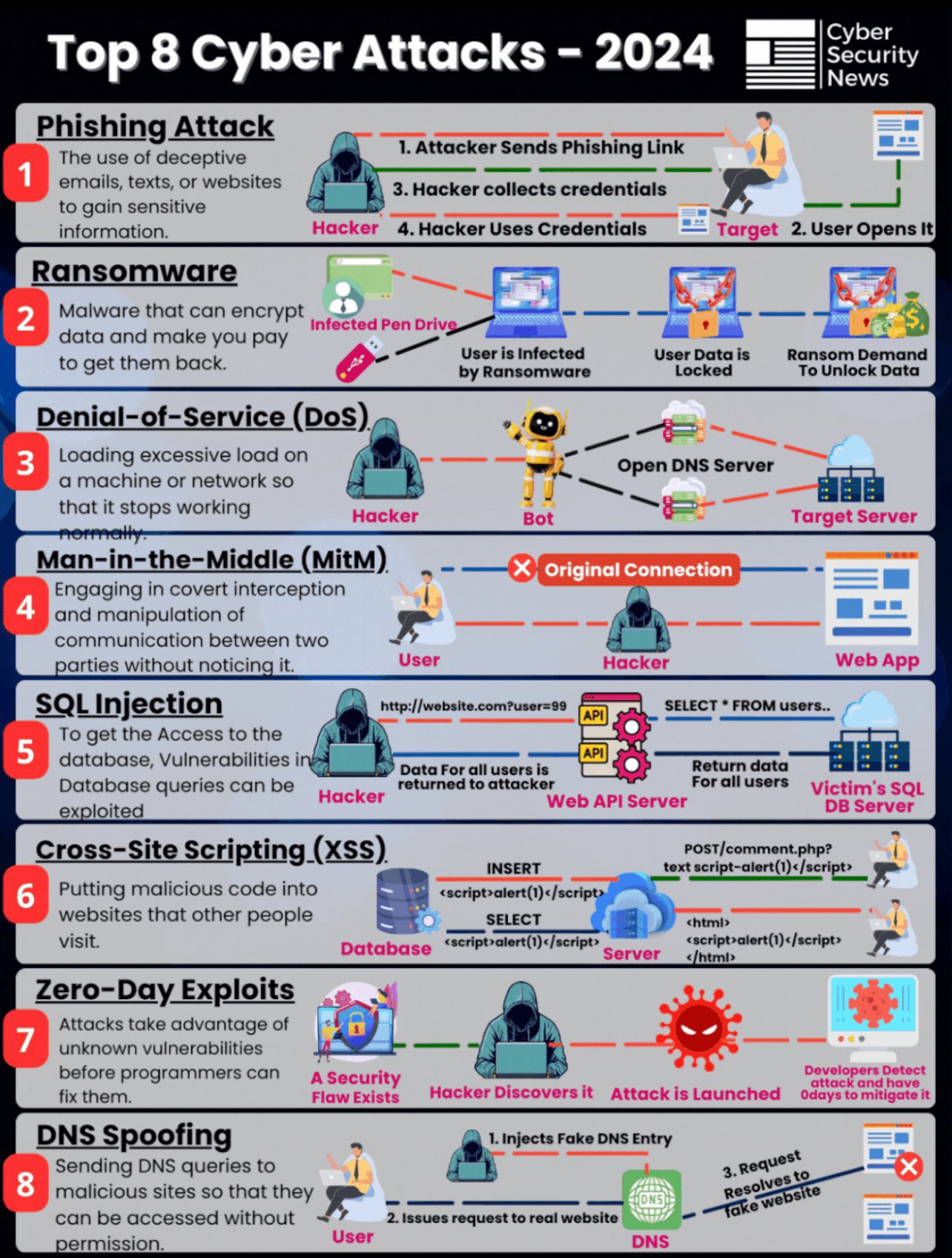](https://osslab.tw/uploads/images/gallery/2024-03/cyber-attacks.jpg)
# Suricata
#### Introduction
Suricata is a high performance, open source network analysis and threat detection software used by most private and public organizations, and embedded by major vendors to protect their assets.
Suricata is far more than an IDS/IPS.
- [Home - Suricata](https://suricata.io/)
- [開源Suricata入侵偵測 揪出網路攻擊與異常行為 | 網管人 (netadmin.com.tw)](https://www.netadmin.com.tw/netadmin/zh-tw/technology/F332544D7A274E8AAAF7D0295328B744)
##### Suricata features
There are three main ways Suricata can be used:
- **Intrusion detection system** (**IDS**): As a network-based IDS, Suricata can monitor network traffic and alert on suspicious activities and intrusions. Suricata can also be set up as a host-based IDS to monitor the system and network activities of a single host like a computer.
- **Intrusion prevention system** (**IPS**): Suricata can also function as an intrusion prevention system (IPS) to detect and block malicious activity and traffic. Running Suricata in IPS mode requires additional configuration such as enabling IPS mode.
- **Network security monitoring** (**NSM**): In this mode, Suricata helps keep networks safe by producing and saving relevant network logs. Suricata can analyze live network traffic, existing packet capture files, and create and save full or conditional packet captures. This can be useful for forensics, incident response, and for testing signatures. For example, you can trigger an alert and capture the live network traffic to generate traffic logs, which you can then analyze to refine detection signatures.
#### Signatures (Rules)
Suricata uses **signatures analysis**, which is a detection method used to find events of interest. Signatures consist of three components:
- **Action**: The first component of a signature. It describes the action to take if network or system activity matches the signature. Examples include: alert, pass, drop, or reject.
- **Header**: The header includes network traffic information like source and destination IP addresses, source and destination ports, protocol, and traffic direction.
- **Rule options:** The rule options provide you with different options to customize signatures.
Here's an example of a Suricata signature:
[](https://osslab.tw/uploads/images/gallery/2024-09/suricata-signature.png)
```
alert http $HOME_NET any -> $EXTERNAL_NET any (msg:"GET on wire"; flow:established,to_server; content:"GET"; http_method; sid:12345; rev:3;)
```
##### Action
Note that the `drop` action also generates an alert, but it drops the traffic. A `drop` action only occurs when Suricata runs in IPS mode.
The `pass` action allows the traffic to pass through the network interface. The pass rule can be used to override other rules. An exception to a drop rule can be made with a pass rule. For example, the following rule has an identical signature to the previous example, except that it singles out a specific IP address to allow only traffic from that address to pass:
```
pass http 172.17.0.77 any -> $EXTERNAL_NET any (msg:"BAD USER-AGENT";flow:established,to_server;content:!”Mozilla/5.0”; http_user_agent; sid: 12365; rev:1;)
```
The `reject` action does not allow the traffic to pass. Instead, a TCP reset packet will be sent, and Suricata will drop the matching packet. A TCP reset packet tells computers to stop sending messages to each other.
**Note:** Rule order refers to the order in which rules are evaluated by Suricata. Rules are loaded in the order in which they are defined in the configuration file. However, Suricata processes rules in a different default order: pass, drop, reject, and alert. Rule order affects the final verdict of a packet.
##### Header
`$HOME_NET` is a Suricata variable defined in `/etc/suricata/suricata.yaml` that you can use in your rule definitions as a placeholder for your local or home network to identify traffic that connects to or from systems within your organization.
##### Rule options
- The `msg:` option provides the alert text. In this case, the alert will print out the text `“GET on wire”`, which specifies why the alert was triggered.
- The `flow:established,to_server` option determines that packets from the client to the server should be matched. (In this instance, a server is defined as the device responding to the initial SYN packet with a SYN-ACK packet.)
- The `content:"GET"` option tells Suricata to look for the word `GET` in the content of the `http.method` portion of the packet.
- The `sid:12345` (signature ID) option is a unique numerical value that identifies the rule.
- The `rev:3` option indicates the signature's revision which is used to identify the signature's version. Here, the revision version is 3.
#### Confiuration file
Configuration files let you customize exactly how you want your IDS to interact with the rest of your environment.
Suricata's configuration file is `suricata.yaml`, which uses the YAML file format for syntax and structure.
#### Log files
There are two log files that Suricata generates when alerts are triggered:
- **eve.json**: The eve.json file is the standard Suricata log file. This file contains detailed information and metadata about the events and alerts generated by Suricata stored in JSON format. For example, events in this file contain a unique identifier called flow\_id which is used to correlate related logs or alerts to a single network flow, making it easier to analyze network traffic. The eve.json file is used for more detailed analysis and is considered to be a better file format for log parsing and SIEM log ingestion.
- **fast.log**: The fast.log file is used to record minimal alert information including basic IP address and port details about the network traffic. The fast.log file is used for basic logging and alerting and is considered a legacy file format and is not suitable for incident response or threat hunting tasks.
The main difference between the eve.json file and the fast.log file is the level of detail that is recorded in each. The fast.log file records basic information, whereas the eve.json file contains additional verbose information.
#### Trigger a custom rule
With a packet capture file
- The `-r sample.pcap` option specifies an input file to mimic network traffic. In this case, the `sample.pcap` file.
- The `-S custom.rules` option instructs Suricata to use the rules defined in the `custom.rules` file.
- The `-k none` option instructs Suricata to disable all checksum checks.
```
sudo suricata -r sample.pcap -S custom.rules -k none
```
Check the logs
```bash
# For fast.log
cat /var/log/suricata/fast.log
# For eve.log, using jq command to display the JSON format
jq . /var/log/suricata/eve.json | less
jq -c "[.timestamp,.flow_id,.alert.signature,.proto,.dest_ip]" /var/log/suricata/eve.json
jq "select(.flow_id==1200997752018164)" /var/log/suricata/eve.json
```
#### Resources
- [Suricata user guide](https://suricata.readthedocs.io/en/latest/index.html)
- [Suricata features](https://suricata.io/features/)
- [Rule management](https://suricata.readthedocs.io/en/latest/rule-management/suricata-update.html)
- [Rule performance analysis](https://suricata.readthedocs.io/en/latest/configuration/suricata-yaml.html#engine-analysis-and-profiling)
- [Suricata threat hunting webinar](https://youtu.be/kaDGolhTu94)
- [Introduction to writing Suricata rules](https://youtu.be/tvoqFBVSShA)
- [Eve.json jq examples](https://suricata.readthedocs.io/en/latest/output/eve/eve-json-examplesjq.html)
# Snort
#### Introduction
Snort is the foremost Open Source Intrusion Prevention System (IPS) in the world. Snort IPS uses a series of rules that help define malicious network activity and uses those rules to find packets that match against them and generates alerts for users.
- [Snort - Network Intrusion Detection & Prevention System](https://www.snort.org/)
- [\[Day18\] 動手架設入侵偵測系統吧~Snort 介紹、安裝教學 - iT 邦幫忙::一起幫忙解決難題,拯救 IT 人的一天 (ithome.com.tw)](https://ithelp.ithome.com.tw/articles/10333128)
# VirusTotal
Analyse suspicious files, domains, IPs and URLs to detect malware and other breaches, automatically share them with the security community.
URL: [https://www.virustotal.com/](https://www.virustotal.com/)
##### Analyze the report
1. **Detection:** This tab provides a list of third-party security vendors and their detection verdicts on an artifact. Detection verdicts include: malicious, suspicious, unsafe, and others. Notice how many security vendors have reported this hash as malicious and how many have not.
2. **Details**: This tab provides additional information extracted from a static analysis of the IoC. Notice the additional hashes associated with this malware like MD5, SHA-1, and more.
3. **Relations**: This tab contains information about the network connections this malware has made with URLs, domain names, and IP addresses. The **Detections** column indicates how many vendors have flagged the URL or IP address as malicious.
4. **Behavior**: This tab contains information related to the observed activity and behaviors of an artifact after executing it in a controlled environment, such as a sandboxed environment. A sandboxed environment is an isolated environment that allows a file to be executed and observed by analysts and researchers. Information about the malware's behavioral patterns is provided through sandbox reports. Sandbox reports include information about the specific actions the file takes when it's executed in a sandboxed environment, such as registry and file system actions, processes, and more. Notice the different types of tactics and techniques used by this malware and the files it created.
> ***Pro tip**: Sandbox reports are useful in understanding the behavior of a file, but they might contain information that is not relevant to the analysis of the file. By default, VirusTotal shows all sandbox reports in the Behavior tab. You can select individual sandbox reports to view. This is helpful because you can view the similarities and differences between reports so that it's easier to identify which behaviors are likely to be associated with the file.*
##### Determine whether the file is malicious
- The **Vendors'** **ratio** is the metric widget displayed at the top of the report. This number represents how many security vendors have flagged the file as malicious over all. A file with a high number of vendor flags is more likely to be malicious.
- The **Community** **Score** is based on the collective inputs of the VirusTotal community. The community score is located below the vendor's ratio and can be displayed by hovering your cursor over the red **X**. A file with a negative community score is more likely to be malicious.
- Under the **Detection** tab, the **Security vendors' analysis** section provides a list of detections for this file made by security vendors, like antivirus tools. Vendors who *have not* identified the file as malicious are marked with a checkmark. Vendors who *have* flagged the file as malicious are marked with an exclamation mark. Files that are flagged as malicious might also include the name of the malware that was detected and other additional details about the file. This section provides insights into a file's potential maliciousness.
Review these three sections to determine if there is a consistent assessment of the file's potential maliciousness such as: a high vendors' ratio, a negative community score, and malware detections in the security vendors' analysis section.
##### Screenshots
[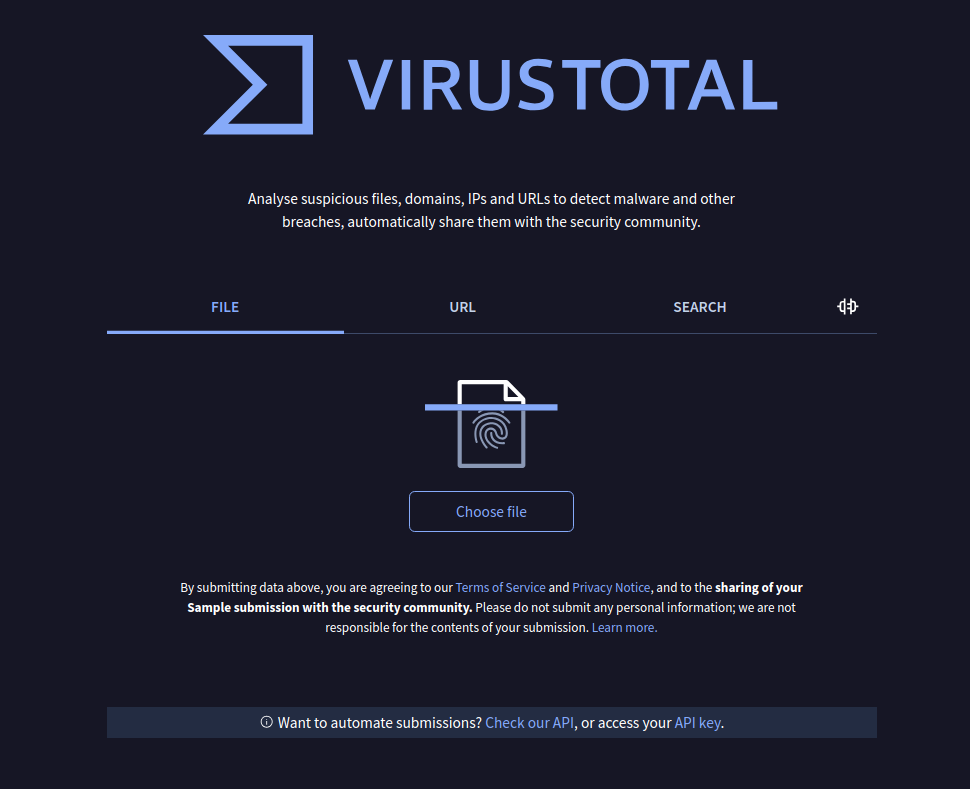](https://osslab.tw/uploads/images/gallery/2024-09/virustotal-1.png)
[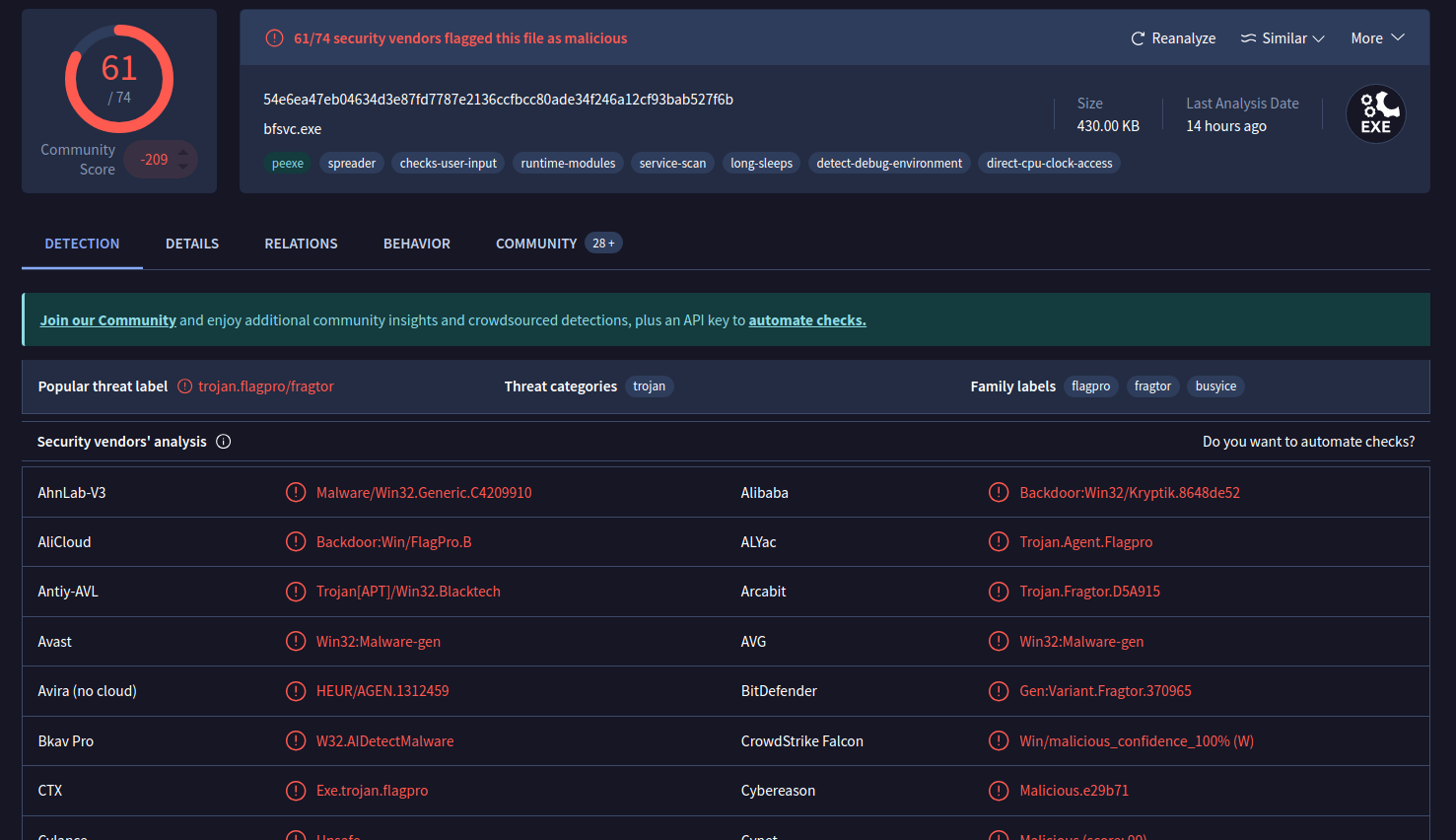](https://osslab.tw/uploads/images/gallery/2024-09/virustotal-2.png)
[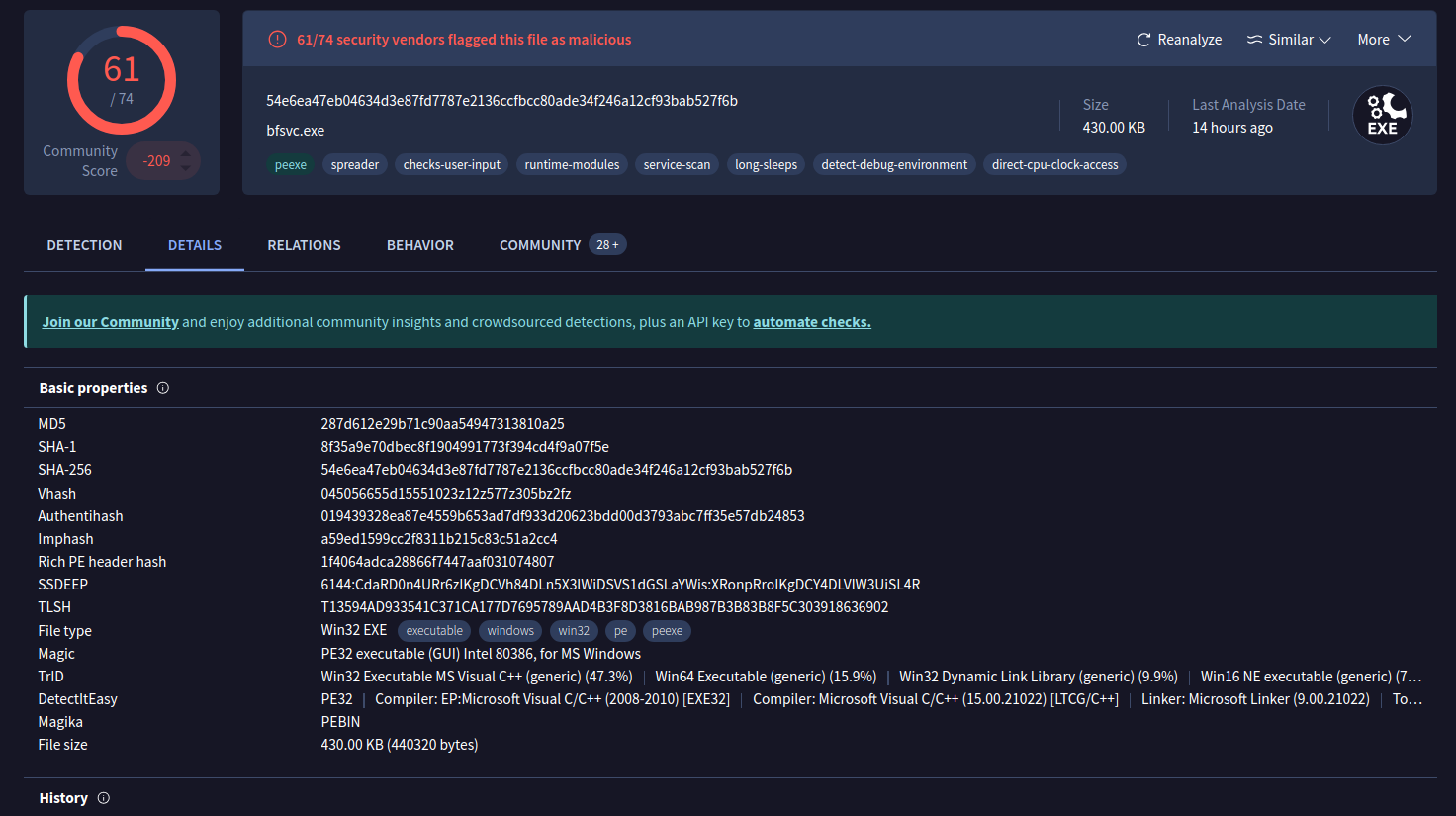](https://osslab.tw/uploads/images/gallery/2024-09/virustotal-3.png)
[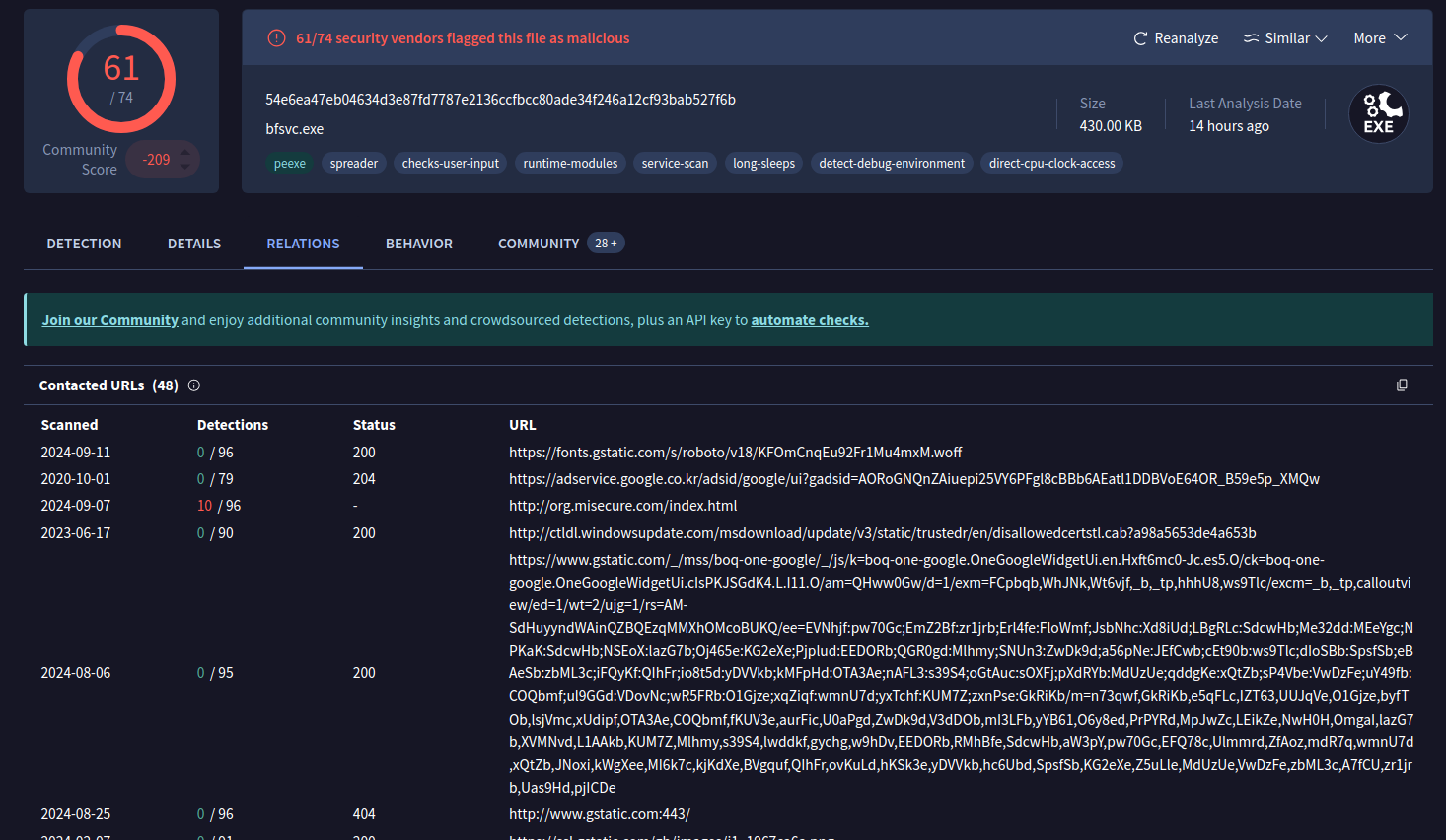](https://osslab.tw/uploads/images/gallery/2024-09/virustotal-4.png)
[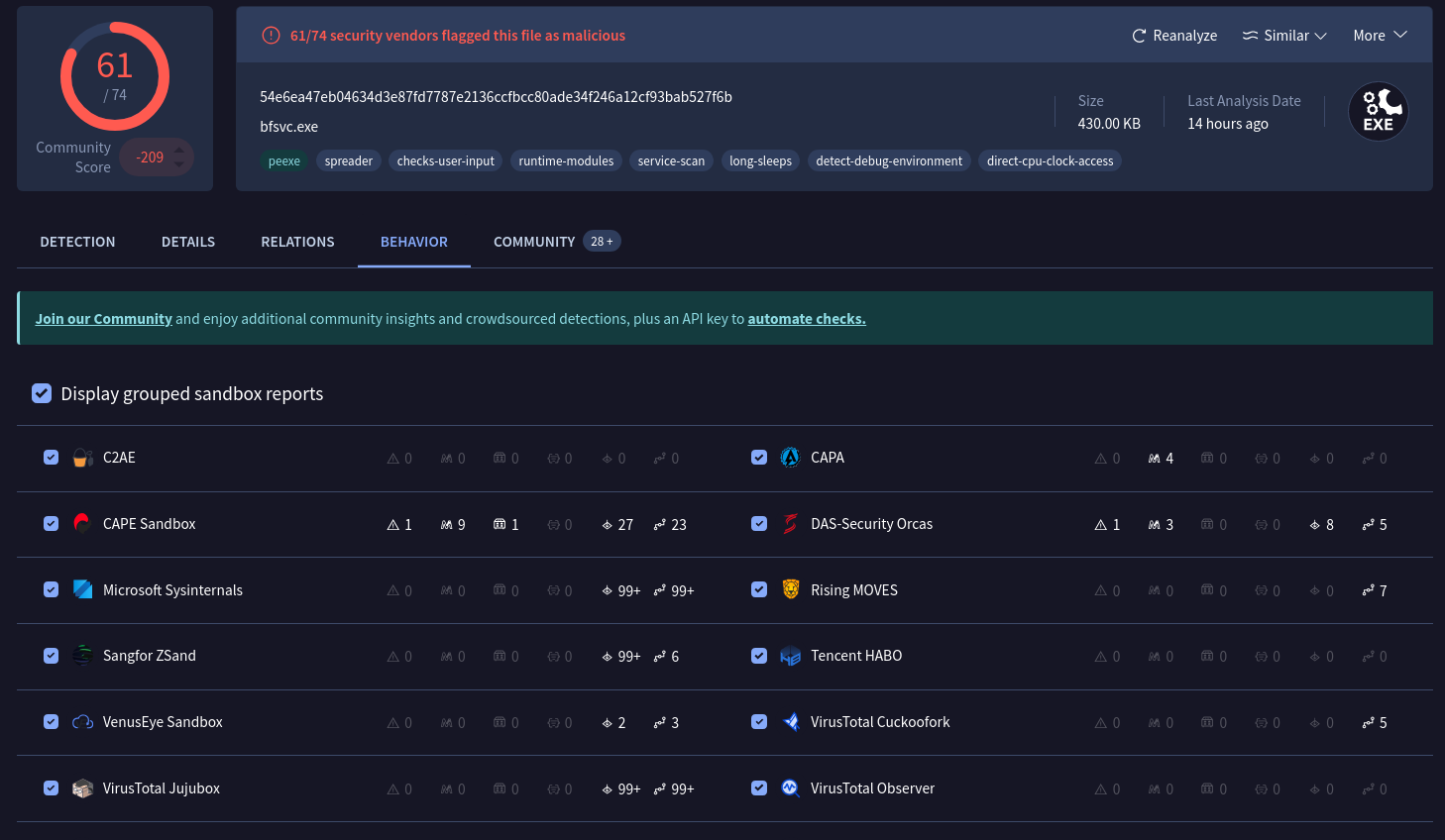](https://osslab.tw/uploads/images/gallery/2024-09/virustotal-5.png)
[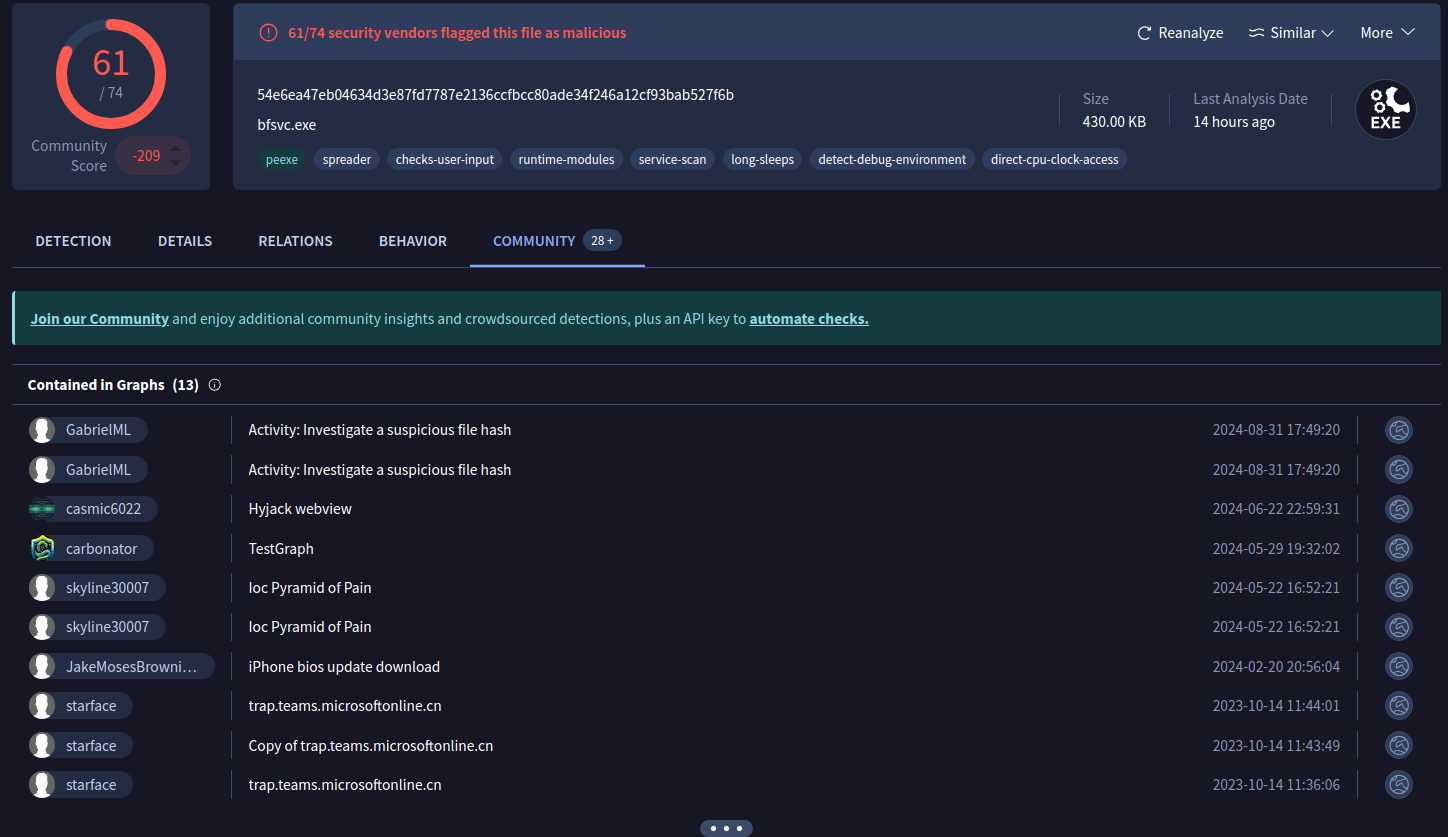](https://osslab.tw/uploads/images/gallery/2024-09/virustotal-6.png)
# Cheat Sheets
##### Cybersecurity Acronyms
[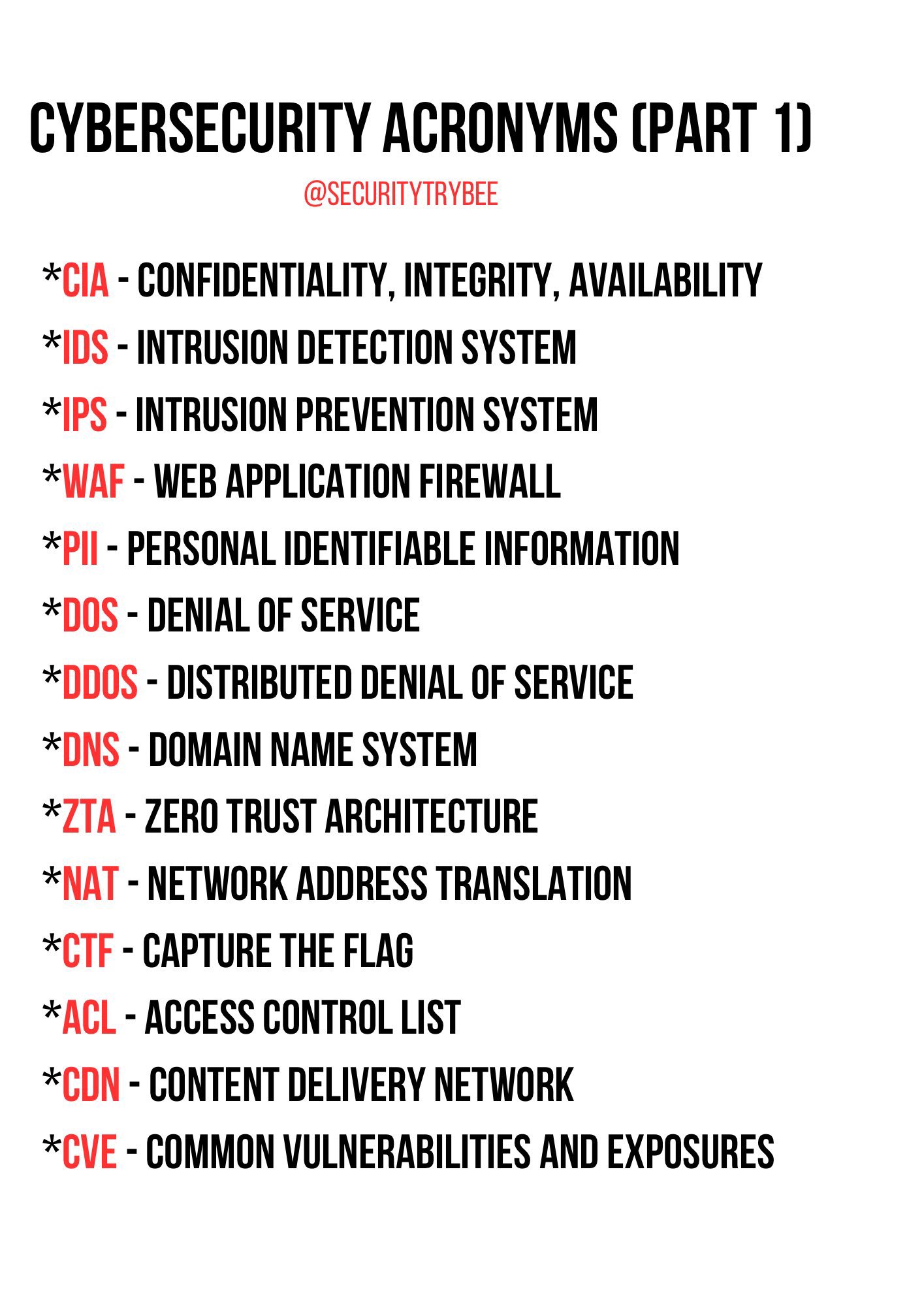](https://osslab.tw/uploads/images/gallery/2024-10/cybersecurity-acronyms-p1.jpg)
##### Common types of password attacks
[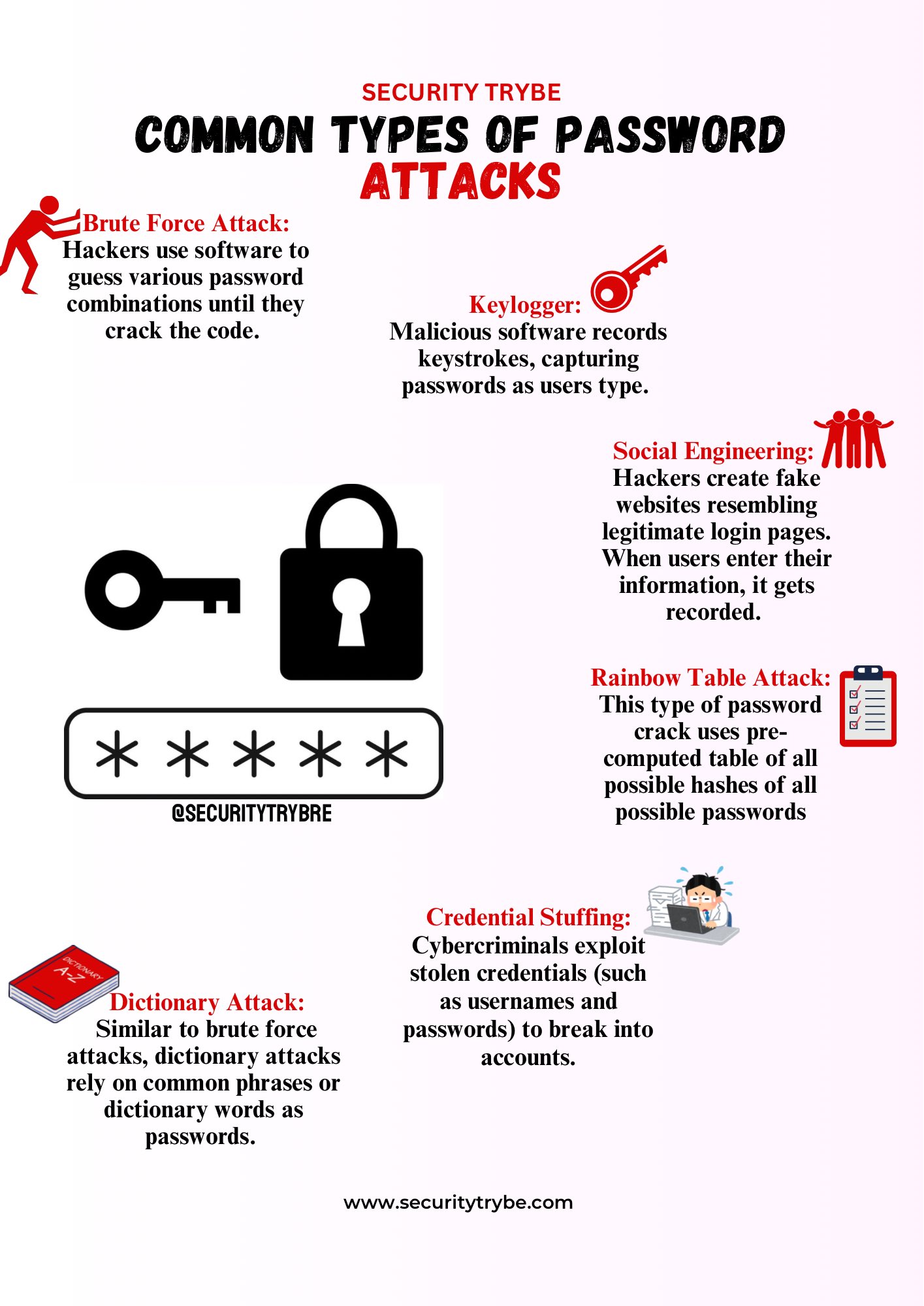](https://osslab.tw/uploads/images/gallery/2024-11/common-types-of-password-attacks.jpg)
##### Designing Secure Systems
[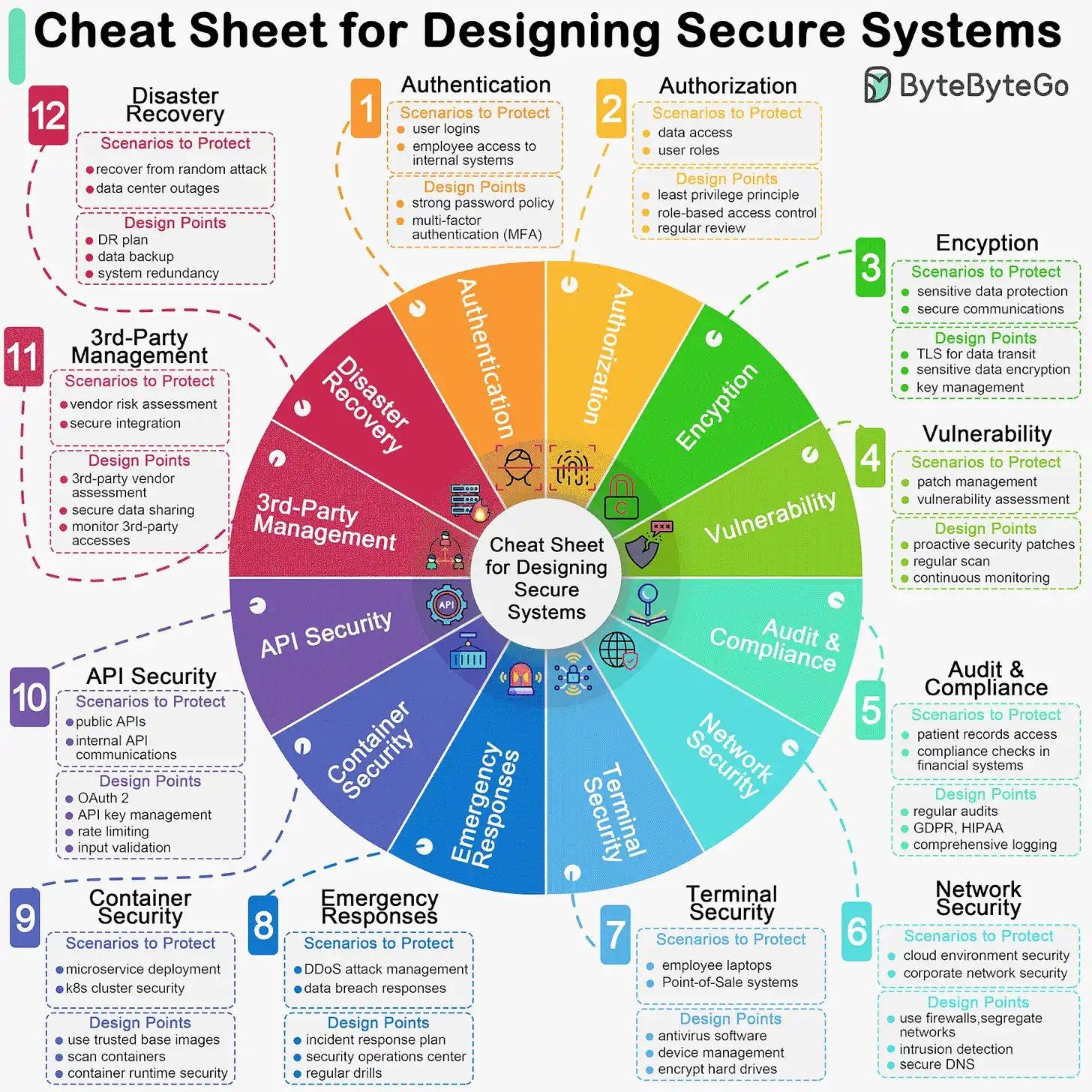](https://osslab.tw/uploads/images/gallery/2024-12/designing-secure-systems.jpg)
##### Risk Management Framework
[](https://osslab.tw/uploads/images/gallery/2025-04/risk-management-framework.jpg)
##### Malware Types
[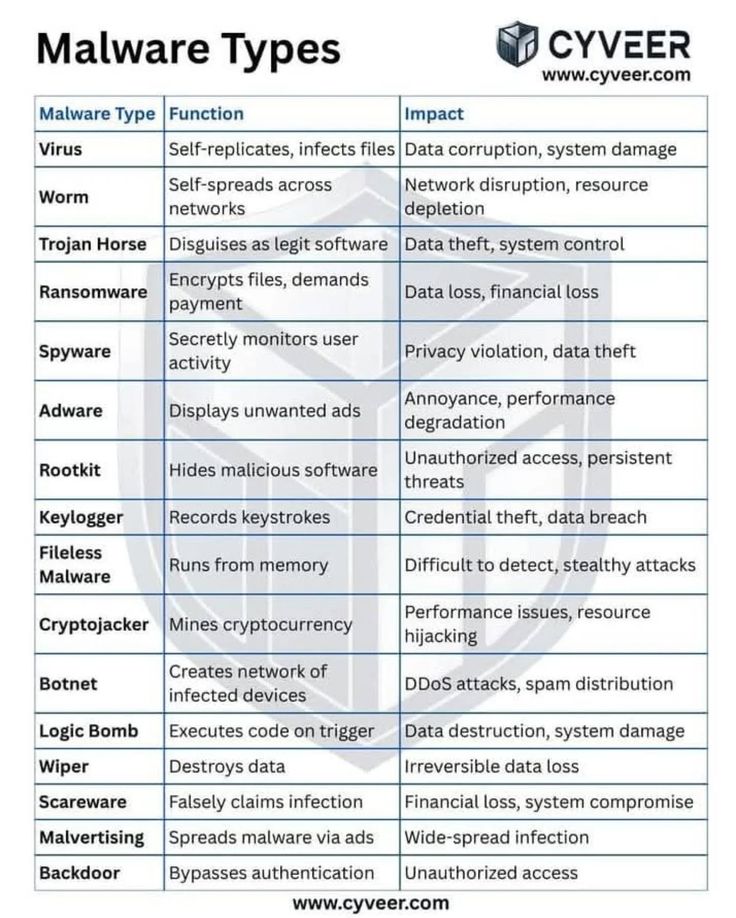](https://osslab.tw/uploads/images/gallery/2025-08/malware-types.jpg)
# Pentest 滲透測試
滲透測試(Penetration Test,簡寫可以稱 Pen Test),是一種用來檢驗網路防禦是否按照預期計畫正常運行的機制。這個測試會模擬駭客和惡意使用者的行為,試圖入侵企業網站、資訊系統或設備,並分析目標的風險層級,評估安全性是否需要加強。最終目的在於,能在真實攻擊發生前,及早發現安全漏洞並加以修正。
#### PentAGI
Advanced AI-Powered Penetration Testing
- [PentAGI - Advanced AI-Powered Penetration Testing](https://pentagi.com/)
- GitHub: [https://github.com/vxcontrol/pentagi](https://github.com/vxcontrol/pentagi)
#### arsenal-ng
滲透工具指令查詢器
- [https://github.com/halilkirazkaya/arsenal-ng](https://github.com/halilkirazkaya/arsenal-ng)
#### Search Engines
[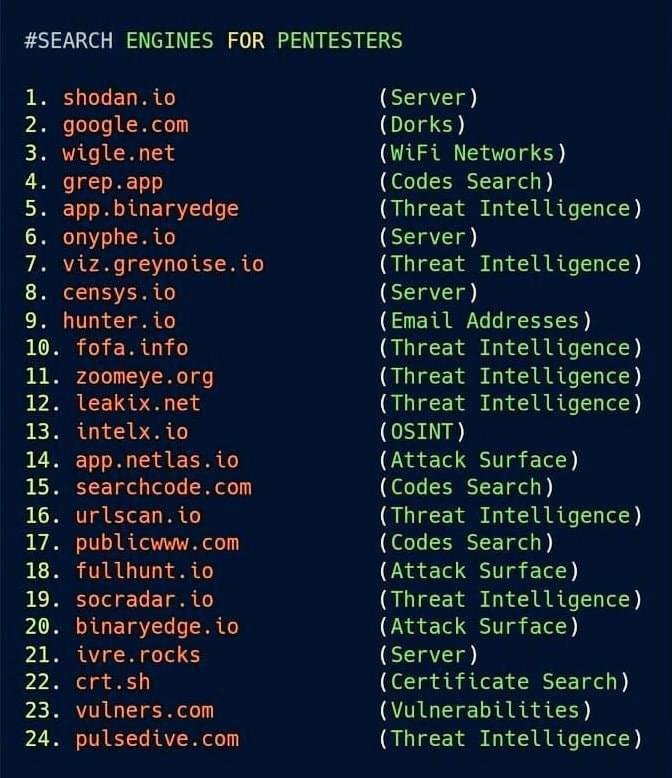](https://osslab.tw/uploads/images/gallery/2024-12/search-engines-for-pentesters.jpg)
# Cybersecurity Certificate
##### Google Cybersecurity Certificates (GCC)
Google 資安證書
- [啟動台灣資安人才培育計畫](https://blog.google/intl/zh-tw/company-news/technology/2024_06_gcc-launch-in-taiwan/)
- [資訊安全人才教育 - Google 安全中心](https://safety.google/intl/zh-TW_tw/cybersecurity-advancements/cyberworkforce/)
- [Google Cybersecurity Certificate - Grow with Google](https://grow.google/certificates/cybersecurity/)
Qualify for the following jobs:
- Cybersecurity analyst
- Information security analyst
- Security analyst
- IT security analyst
- SOC analyst
- Cyber defense analyst
You'll learn about:
- Programming for cybersecurity tasks
- Frameworks and controls that inform security operations
- Using security information and event management (SIEM) tools for cybersecurity
- Detecting and responding to incidents using an intrusion detection system
- Performing packet capture and analysis
- Using AI to boost productivity
# Cybersecurity Tools
#### Seach More
- [10 Top Open Source Penetration Testing Tools](https://www.esecurityplanet.com/applications/open-source-penetration-testing-tools/)
- [OSV-Scanner](https://osv.dev/)
- [5 Tools to Scan a Linux Server for Malware and Rootkits (tecmint.com)](https://www.tecmint.com/scan-linux-for-malware-and-rootkits/)
- [Hottest cybersecurity open-source tools of the month: May 2025 - Help Net Security](https://www.helpnetsecurity.com/2025/05/28/hottest-cybersecurity-open-source-tools-of-the-month-may-2025/)
#### Online Tools
| 網站 | 功能描述 |
|---|
| shodan.io | 搜索互聯網連接設備的搜索引擎。 |
| censys.io | 提供互聯網設備和網絡資產信息的搜索平台。 |
| hunter.io | 查找與特定域名相關的電子郵件地址的工具。 |
| fullhunt.io | 自動化攻擊面管理和漏洞發現平台。 |
| onyphe.io | 網絡資產搜索和網絡安全信息收集引擎。 |
| socradar.io | 提供實時網絡威脅情報和數字風險保護服務。 |
| binaryedge.io | 互聯網範圍掃描和網絡風險評估平台。 |
| ivre.rocks | 開源網絡偵察框架。 |
| crt.sh | 搜索和查詢SSL/TLS證書的數據庫。 |
| vulners.com | 綜合性漏洞數據庫和安全內容存儲庫。 |
| publicwww.com | 源代碼搜索引擎,用於在網頁源碼中查找特定代碼片段。 |
| pulsedive.com | 威脅情報和網絡安全數據聚合平台。 |
| intelx.io | 多源開放源情報(OSINT)搜索和分析工具。 |
| wigle.net | 無線網絡數據庫和地圖服務。 |
| viz.greynoise.io | 分析和可視化互聯網噪聲和惡意活動的平台。 |
#### Vulnerability Scanner
- [OpenVAS](https://osslab.tw/books/cybersecurity/page/openvas "OpenVAS")
- [Nessus](https://osslab.tw/books/cybersecurity/page/nessus "Nessus")
- [RustScan : The Modern Port Scanner](https://github.com/RustScan/RustScan)
- [Vuls](https://vuls.io/) : Agentless Vulnerability Scanner for Linux/FreeBSD
- GitHub: [https://github.com/future-architect/vuls](https://github.com/future-architect/vuls)
- [Vuls: A Free, Open Source Vulnerability Scanner for Linux - The New Stack](https://thenewstack.io/vuls-a-free-open-source-vulnerability-scanner-for-linux/)
- [Vuls: Open-source agentless vulnerability scanner - Help Net Security](https://www.helpnetsecurity.com/2025/05/05/vuls-open-source-agentless-vulnerability-scanner/)
#### Tools
##### -Wazuh
The Open Source Security Platform
- [https://wazuh.com/](https://wazuh.com/)
- YT: [this Cybersecurity Platform is FREE](https://www.youtube.com/watch?v=i68atPbB8uQ)
- YT: [you need this FREE CyberSecurity tool](https://www.youtube.com/watch?v=3CaG2GI1kn0)
- YT: [Wazuh Open Source SIEM Tutorial - YouTube](https://www.youtube.com/watch?v=u4tMvUCUXqY)
- YT: [Wazuh! Powerful, Open Source Endpoint Security Monitoring!](https://www.youtube.com/watch?v=dwr-4CXtOso)
##### -Web Check
All-in-one OSINT tool for analysing any website
- [Web Check (web-check.xyz)](https://web-check.xyz/)
- GitHub: [https://github.com/Lissy93/web-check](https://github.com/Lissy93/web-check)
##### -OWASP: Nettacker
Automated Penetration Testing Framework (自動滲透測試框架)
- [OWASP/Nettacker: Automated Penetration Testing Framework](https://github.com/OWASP/Nettacker)
##### -WAF: Web Application Firewall
- [GoTestWAF](https://github.com/wallarm/gotestwaf)
- [Test and evaluate your WAF before hackers](https://lab.wallarm.com/test-your-waf-before-hackers/)
- [SafeLine](https://waf.chaitin.com/) - A self-hosted WAF(Web Application Firewall)
- YT: [SafeLine: A Feature-Rich WAF with a Catch (or Two)](https://www.youtube.com/watch?v=AwfNqWvMVTI)
- [waf-checker](https://github.com/PAPAMICA/waf-checker)
##### -Pi-Alert: WiFi/LAN 連網裝置偵測
- [Pi.Alert](https://github.com/pucherot/Pi.Alert)
- \[Video\] [Pi Alert - Open Source, Self Hosted, Network Device Change Notification and Intrusion Detection](https://www.youtube.com/watch?v=oKl3WFQloE4)
##### -WatchYourLAN
- GitHub: [https://github.com/aceberg/WatchYourLAN](https://github.com/aceberg/WatchYourLAN)
##### -ntopng
Network traffic monitor
- [ntopng – ntop](https://www.ntop.org/products/traffic-analysis/ntop/)
- YT: [NTopNG - A Free, Open Source, Self Hosted, Network Monitoring and Analysis Tool. - YouTube](https://www.youtube.com/watch?v=sJkLmjaj02E&list=PLjLkaXQ35322Of0hhUfhlMuGEl-feXZQB)
##### -ImHex: Hex Editor
A Hex Editor for Reverse Engineers, Programmers and people who value their retinas when working at 3 AM
- GitHub: [https://github.com/WerWolv/ImHex/](https://github.com/WerWolv/ImHex/)
##### -OSSIEM
Open Source SIEM Stack, Wazuh + Graylog + Velociraptor + Copilot
- GitHub: [https://github.com/socfortress/OSSIEM](https://github.com/socfortress/OSSIEM)
##### -Fishing Test
- [pfish](https://github.com/pow1e/pfish) - 轻量级的无害化钓鱼
##### -CISO Assistant
CISO Assistant is a one-stop-shop for GRC, covering Risk, AppSec and Audit Management
- GitHub: [https://github.com/intuitem/ciso-assistant-community](https://github.com/intuitem/ciso-assistant-community)
##### -MISP
MISP (Malware Information Sharing Platform)
- [https://www.misp-project.org/](https://www.misp-project.org/)
##### -exploitarium
大量真實世界 PoC、CVE 與漏洞研究的龐大收藏
- [https://github.com/bikini/exploitarium](https://github.com/bikini/exploitarium)
#### Cybersecurity Linux Distro.
- [TOP VIRTUAL MACHINES FOR CYBERSECURITY PROFESSIONALS | by Flavio Queiroz | CTI Flash Insights | Medium](https://medium.com/cti-insights/top-virtual-machines-for-cybersecurity-professionals-b111930c2ba2)
- [Kali Linux](https://www.kali.org/)
- [ParrotOS](https://www.parrotsec.org/)
- [BlackArch Linux](https://www.blackarch.org/index.html) 是一款基於 Arch Linux 的滲透測試發行版,專為滲透測試人員與資安研究人員設計。其軟體庫內含 2866 種工具。您可以單獨安裝工具,或以群組形式進行安裝。BlackArch Linux 與現有的 Arch 系統相容。
#### AI Tools
- \[pyimagesearch\] [Build a Network Intrusion Detection System with Variational Autoencoders](https://pyimagesearch.com/2024/11/18/build-a-network-intrusion-detection-system-with-variational-autoencoders/)
- [reverse-skills](https://github.com/zhaoxuya520/reverse-skill) - 逆向工程與網路安全分析技能
- [Flounder](https://flounders.xyz/) - 基於 AI Agent 的全自動漏洞挖掘工作流
- [Anthropic Cybersecurity Skills](https://github.com/mukul975/Anthropic-Cybersecurity-Skills) - The largest open-source cybersecurity skills library for AI agents
##### AI Models
- [DeepHat](https://huggingface.co/DeepHat/DeepHat-V1-7B) - 訓練以專業水準處理進攻與防禦網路安全。漏洞利用製作、漏洞分析、修復,應有盡有。長上下文處理,適合挖掘海量日誌。且小巧到能在消費級硬體上運行。
# Honey Pot 蜜罐陷阱
##### Introduction
- [什麼是誘捕系統(Honey Pot)? | iThome](https://www.ithome.com.tw/news/27824)
- [防止伺服器變殭屍電腦有新招 趨勢用HoneyPot陷阱誘捕Bot病毒 | iThome](https://www.ithome.com.tw/news/90737)
##### Self-hosted Services
- [Awesome-Honeypot](https://github.com/code-byter/Awesome-Honeypot) - Cowrie Honeypot with Elasticsearch