# VPN
虛擬私人網路(英語:virtual private network,縮寫:VPN)將專用網路延伸到公共網路上,使使用者能夠在共享或公共網路上傳送和接收資料,就像他們的計算裝置直接連接到專用網路上一樣。VPN的好處包括增加專用網路的功能、安全性和管理,它提供了對公共網路上無法存取的資源存取通常用於遠端辦公人員。加密很常見但不是VPN連接的原生部分。
VPN是通過使用專用線路或在現有網路上使用隧道協定建立一個虛擬的對等連接而形成的。可從公共 Internet 獲得的 VPN可以提供廣域網路 (WAN) 的一些好處。 從使用者的角度來看,可以遠端存取專用網路中可用的資源。
# n2n VPN
##### Introduction
n2n 已經停止維護多年,請改用 EasyTier,或其他方案。
[n2n](https://www.ntop.org/products/n2n/) is a layer-two **peer-to-peer** virtual private network (VPN) which allows users to exploit features typical of P2P applications at network instead of application level. This means that users can gain native IP visibility (e.g. two PCs belonging to the same n2n network can ping each other) and be reachable with the same network IP address regardless of the network where they currently belong. In a nutshell, as OpenVPN moved SSL from application (e.g. used to implement the https protocol) to network protocol, n2n moves P2P from application to network level.
In order to start using n2n, two elements are required:
- A *supernode*: it allows edge nodes to announce and discover other nodes. It must have a port publicly accessible on internet.
- *edge* nodes: the nodes which will be a part of the virtual networks
A virtual network shared between multiple edge nodes in n2n is called a *community*. A single supernode can relay multiple communities and a single computer can be part of multiple communities at the same time. An encryption key can be used by the edge nodes to encrypt the packets within their community.
n2n tries to establish a direct peer-to-peer connection via udp between the edge nodes when possible. When this is not possible (usually due to special NAT devices), the supernode is also used to relay the packets.
[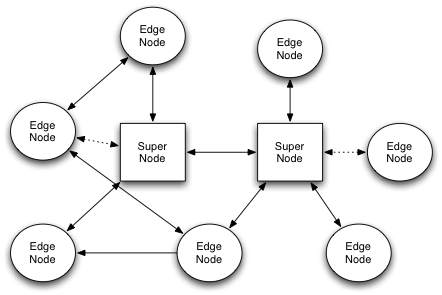](https://osslab.tw/uploads/images/gallery/2022-06/n2n-network.png)
[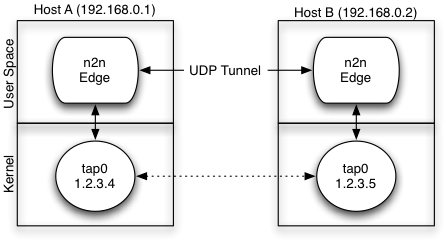](https://osslab.tw/uploads/images/gallery/2022-06/n2n-com.png)
##### Installation
Download: [https://github.com/ntop/n2n](https://github.com/ntop/n2n)
Ubuntu/Debian
```shell
sudo dpkg -i n2n_3.0.0-1038_amd64.deb
sudo apt install -f
```
##### Usage
One-liner command in foreground.
```shell
# On Linux, change the community, encrypt key and tun IP to your own
# edge -c -k -a -l -f
sudo edge -c my-community -k my-secret -a 10.9.9.10 -l n2n.lucktu.com:10090 -f
```
Run as service in background.
```shell
# Generate the config file
sudo cp /etc/n2n/edge.conf.sample /etc/n2n/edge.conf
# Start the edge
sudo systemctl start edge
sudo systemctl enable edge
```
##### Supernode
```shell
sudo supernode -p 10090
```
##### 相關連結
- [https://github.com/ntop/n2n](https://github.com/ntop/n2n)
- [n2n for Windows](https://github.com/lucktu/n2n)
- [n2n GUI for Win](http://luca.ntop.org/n2nWin32/)
- [OpenVPN Download](https://build.openvpn.net/downloads/releases/)
- [Public Supernodes](http://www.supernode.ml/)
- [ZeroTier](https://www.zerotier.com/) - P2P VPN Service
- [FRP](https://github.com/fatedier/frp) - Fast Reverse Proxy
- \[Video\] [【司波图】FRP内网穿透教程,看得完你就会了](https://www.youtube.com/watch?v=KeecUhhfIE8)
# FreeLAN
##### Introduction
[Freelan](https://www.freelan.org/) is a free, open-source, multi-platform, peer-to-peer VPN software that abstracts a LAN over the Internet. It works on Windows, Linux and Mac OSX.
Whether you want to connect the computers of your family, play an old LAN-only game with your friends, or give a privileged access to your private network to your collaborators, freelan will do the job perfectly.
[FreeLAN](https://www.freelan.org/) is free all-around VPN open-source software for Windows, Linux, and macOS that can be used to create three types of VPN:
- Client-server
- Peer-to-peer
- Hybrid that includes the two types mentioned above.
##### Installation
Download: [https://www.freelan.org/download.html](https://www.freelan.org/download.html)
Ubuntu/Debian
```shell
sudo apt update
sudo apt install freelan
```
Windows
1. [下載 Visual C++](https://docs.microsoft.com/zh-tw/cpp/windows/latest-supported-vc-redist?view=msvc-170)。
2. [下載 freelan-2.2.0-amd64-install.exe](https://github.com/freelan-developers/freelan/releases)。
##### Usage
One-liner command in foreground.
```shell
# On PC#1, which is correctly configured to allow access to the 12000/UDP from the internet.
# By default, the listen port is 12000/UDP and the tun_tap.ip_address is 9.0.0.1
freelan --security.passphrase "my_secret"
# On PC#2
freelan --security.passphrase "my_secret" --tap_adapter.ipv4_address_prefix_length 9.0.0.2/24 --fscp.contact :12000
```
# Outline
##### 簡介
[Outline](https://getoutline.org/zh-TW/) 讓所有使用者都能執行自己專屬的 VPN,以更安全的方式存取無審查的開放網路。透過 Outline 執行專屬 VPN 伺服器不但使存取網路變得更安全,網路連線也較不容易遭人蓄意封鎖。
##### 相關連結
- [https://getoutline.org/zh-TW](https://getoutline.org/zh-TW)
- [https://github.com/Jigsaw-Code](https://github.com/Jigsaw-Code)
- [使用OUTLINE](https://support.getoutline.org/s/topic/0TO0b000000USnJGAW/using-outline?language=zh_TW)
- [Outline VPN:輕鬆建立 VPN 的好選擇](https://noob.tw/outline-vpn/)
- [https://outline.community/](https://outline.community/)
For ARM CPU
- [Outline Server with ARM64 support](https://github.com/kugaevsky/outline-server-arm64)
# WireGuard
#### WireGuard Server
- [wireguard-install](https://github.com/Nyr/wireguard-install)
#### WireGuard Client
- YT: [WireGuard - How to Install and Configure WireGuard VPN Client on Ubuntu | Debian | LinuxMint - YouTube](https://www.youtube.com/watch?v=RT8drPYW4qs)
- [wireguird](https://github.com/UnnoTed/wireguird) - wireguard gtk gui for linux
- [How to configure WireGuard VPN client with NetworkManager GUI](https://www.xmodulo.com/wireguard-vpn-network-manager-gui.html)
- [How to set up Wireguard VPN under Linux - Tutorial - YouTube](https://www.youtube.com/watch?v=-4zcUmY05YA)
##### wg-quick
Installation
```bash
# Ubuntu/Debian
sudo apt install wireguard
# Fedora
sudo dnf -y install wireguard-tools
```
Generate the key pairs
```bash
sudo -i
cd /etc/wireguard
wg genkey | tee privatekey | wg pubkey > publickey
```
Configure the WireGuard interface on Peer A
`/etc/wireguard/wg0.conf` :
```bash
cat << EOF > /etc/wireguard/wg0.conf
[Interface]
Address = 10.0.0.2/32
PrivateKey = XXXXXXXXXXXXXXXXXXXXXXXXXXXXXXXXXXXX
DNS = 8.8.8.8, 4.4.4.4
[Peer]
PublicKey = XXXXXXXXXXXXXXXXXXXXXXXXXXXXXXXXXXXX
AllowedIPs = 0.0.0.0/0
Endpoint = the.wireguard.server:51820
EOF
```
Up & Down the wg link
```bash
sudo wg-quick up wg0
sudo wg
sudo journalctl -fu wg-quick@wg0
sudo wg-quick down wg0
```
##### nmcli
```bash
# Import the config file
CONF_FILE="wg0.conf"
nmcli connection import type wireguard file "$CONF_FILE"
# Show the profiles
nmcli
nmcli conn show # List all profiles
nmcli conn show # Display the details for specified profile
# Delete the profile
nmcli connection delete wg0
# Modify the profile my-wg0
nmcli connection modify my-wg0 \
autoconnect yes \
ipv4.method manual \
ipv4.addresses 192.168.7.5/24 \
wireguard.listen-port 50000 \
...
# Active/Inactive the interface
nmcli connection up my-wg0
nmcli connection down my-wg0
```
#### Algo VPN
- [Algo VPN](https://github.com/trailofbits/algo) is a set of Ansible scripts that simplify the setup of a personal WireGuard and IPsec VPN.
#### NetBird
- [NetBird](https://netbird.io/) combines a configuration-free peer-to-peer private network and a centralized access control system in a single open-source platform
- \[Video\] [Netbird - an Open Source, Self Hosted Wireguard based VPN system. Server GUI and client setup ease](https://www.youtube.com/watch?v=_-vfSgqmOUI)
- [Proxmox VE for Beginners Guide with NetBird LXC](https://netbird.io/knowledge-hub/proxmox-getting-started-guide)
#### PiVPN
[PiVPN](https://www.pivpn.io/) is a lightweight, open-source project designed to simplify setting up a VPN server on a Raspberry Pi or any Debian-based system.
It supports WireGuard and OpenVPN, allowing you to create a secure, private tunnel to your home network or VPS.
- [Self-host Your Own VPN Using PiVPN](https://linuxhandbook.com/self-host-pivpn/)
#### wg-easy
[wg-easy](https://wg-easy.github.io/wg-easy/edge/) is the easiest way to run WireGuard VPN + Web-based Admin UI.
- GitHub: [https://github.com/wg-easy/wg-easy](https://github.com/wg-easy/wg-easy)
#### WGDashboard
[WGDashboard](https://wgdashboard.dev/) is a simple and easy-to-use dashboard to manage your WireGuard & AmneziaWG VPN Server(s).
#### WireGuard-UI
A web user interface to manage your WireGuard setup.
- GitHub: [https://github.com/ngoduykhanh/wireguard-ui](https://github.com/ngoduykhanh/wireguard-ui)
- [How to Install WireGuard VPN + Web UI on Ubuntu](https://www.tecmint.com/setup-wireguard-vpn-server-web-ui-ubuntu/)
# Cloudflare Tunnel
Cloudflare Tunnel 是一款內網穿透的隧道軟體,也是 Argo Tunnel 前身分出來做為免費版使用,它可以快速建立安全地加密到任何服務的流量,可以保護您的伺務器免受直接攻擊,就像本身伺服器跟 Cloudflare 最近的資料中心之間,建立一條 Tunnel 私有通道,所以在 Router 防火牆不需開任何對外 Port 埠,避免資訊洩露。
不需要在 Firewall 上的外部網路開啟任何 port,外部電腦也能直接存取 NAT 內部伺服器。
- [Cloudflare Tunnel](https://www.cloudflare.com/zh-tw/products/tunnel/)
- [Cloudflare Docs: Cloudflare Tunnel](https://developers.cloudflare.com/cloudflare-one/connections/connect-apps/)
- [免費 Cloudflare Tunnel 取代伺服器對外服務裸奔](https://www.sakamoto.blog/cloudflare-tunnel/)
- \[Video\] [You Need to Learn This! Cloudflare Tunnel Easy Tutorial](https://www.youtube.com/watch?v=ZvIdFs3M5ic)
#### Alternatives
##### Pangolin
Pangolin - Tunneled Reverse Proxy Management Server with Identity and Access Control and Dashboard UI
- GitHub: [https://github.com/fosrl/pangolin](https://github.com/fosrl/pangolin)
- [I stopped using Cloudflare Tunnels for everything, and here's what I use instead](https://www.xda-developers.com/stopped-using-cloudflare-tunnels-for-everything-heres-what-use-instead/)
# ngrok
ngrok - put localhost on the internet
應用場景:
- 安全的連線至客戶的網路環境
- 連線至 dev/test 環境,例如測試整合 webhook、與團隊一起預覽開發網站、測試驗證手機後端程式
##### Pyngrok
ngrok SDK for Python
- [pyngrok - a Python wrapper for ngrok — pyngrok 7.1.6 documentation](https://pyngrok.readthedocs.io/en/latest/)
- GitHub: [https://github.com/alexdlaird/pyngrok](https://github.com/alexdlaird/pyngrok)
##### URLs
- [ngrok | Unified Application Delivery Platform for Developers](https://ngrok.com/)
- [使用 ngrok 服務讓人連線到你的 localhost 伺服器 - MyApollo](https://www.myapollo.com.tw/blog/development-tool-ngrok/)
類似的服務
- [Localtunnel ~ Expose yourself to the world](https://theboroer.github.io/localtunnel-www/)
- [localhost.run | localhost.run](https://localhost.run/)
- [pgrok](https://github.com/R44VC0RP/pgrok) - Personal ngrok alternative.
# More Solutions
#### EasyTier
EasyTier is a simple, safe and decentralized VPN networking solution implemented with the Rust language and Tokio framework.
> 類似 n2n VPN 的工作原理,不需要特定的中央管理主機,而是選擇任一個或多個節點扮演中央主機。安全性有網路名稱與密碼的設置。
- [https://www.easytier.top/en/](https://www.easytier.top/en/)
- GitHub: [https://github.com/EasyTier/EasyTier](https://github.com/EasyTier/EasyTier)
#### Nebula
A scalable overlay networking tool with a focus on performance, simplicity and security
- Doc: [https://nebula.defined.net/docs/](https://nebula.defined.net/docs/)
- GitHub: [https://github.com/slackhq/nebula](https://github.com/slackhq/nebula)
#### Chisel
Chisel is a fast TCP/UDP tunnel, transported over HTTP, secured via SSH. Single executable including both client and server. Written in Go (golang). Chisel is mainly useful for passing through firewalls, though it can also be used to provide a secure endpoint into your network.
- GitHub: [https://github.com/jpillora/chisel](https://github.com/jpillora/chisel)
- [Chisel 建立反向 TCP 隧道 - iT 邦幫忙::一起幫忙解決難題,拯救 IT 人的一天 (ithome.com.tw)](https://ithelp.ithome.com.tw/articles/10335772)
- [Chisel: Secure TCP/UDP Tunneling for Modern Networks - Deniz Halil](https://denizhalil.com/2024/01/10/network-tunneling-chisel/)
#### Tinc
Tinc is free and open-source VPN software that can be used to create mesh VPN networks. It is a small and powerful peer-to-peer VPN daemon that can be installed on multiple platforms. Tinc uses encryptions and tunneling for creating a secure private network between multiple hosts.
Requirement: 每個 node 需要設定 Public IP
- [How to Set Up Peer-to-Peer VPN with Tinc on Ubuntu 22.04](https://www.howtoforge.com/how-to-set-up-peer-to-peer-vpn-with-tinc-on-ubuntu-22-04/)
#### Tunneled Mesh Reverse Proxy
類似自行託管的 Cloudflare Tunnel 服務,適合網站型的服務。
##### Pangolin
Pangolin 是一款具有身份和存取控制功能的自託管隧道式反向代理伺服器,專為在分散式網路中安全地揭露私有資源而設計。Pangolin 作為一個中央樞紐,可透過加密的隧道連接隔離的網路 (甚至是位於限制性防火牆後面的網路),讓您不需開啟連接埠即可輕鬆存取遠端服務。
- [Fossorial](https://fossorial.io/)
- GitHub: [https://github.com/fosrl/pangolin](https://github.com/fosrl/pangolin)
- [Pangolin is my new self-hosted best friend for my home lab](https://www.xda-developers.com/alternative-to-tailscale-or-nginx-remote-access-home-lab/)
##### Wiredoor
Wiredoor is a self-hosted, open-source ingress-as-a-service platform that allows you to expose applications and services running in private or local networks to the internet—securely, reliably, and without complex infrastructure.
It uses reverse VPN connections powered by WireGuard and exposes services through a built-in NGINX reverse proxy. Perfect for developers, operators, or teams that want full control of their ingress without relying on public cloud solutions.
- [https://www.wiredoor.net/](https://www.wiredoor.net/)
- GitHub: [https://github.com/wiredoor/wiredoor](https://github.com/wiredoor/wiredoor)
# Tailscale
[Tailscale](https://tailscale.com/) 是一個 Mesh VPN 雲端服務,基於 WireGuard 的 end-to-end 加密 VPN 技術,可用於 Peer-to-peer VPN,可穿越 NAT,中央管理控制台,免費版支援 3 個帳號 100 個裝置。
特點:
- Peer-to-peer VPN 應用:IoT 設備管理
- Tunnel VPN 應用:Netflix Sharing
- 無複雜設定,不是 Client-server 架構
- 支援跨平台系統
- 不需要在防火牆做任何開放通訊埠設定,就可以讓外部電腦存取私有 NAT 網路內的電腦或連網裝置。
- 安全性
- 使用第三方認證供應商,例如 Google, Microsoft AD, GitHub, Okta 等。
- Access Controls Lists (ACLs)
- 多個使用者角色
教學:
- [Tailscale quickstart](https://tailscale.com/kb/1017/install)
- [How you can connect two home labs with a site-to-site VPN (and why you should)](https://www.xda-developers.com/how-connect-two-home-labs-site-site-vpn/)
- [How to Set Up Remote Access to Your Local Network Using Tailscale VPN](https://www.howtogeek.com/how-to-remote-access-your-network-using-tailscale-vpn/)
- NetBird: [I switched from Tailscale to this fully self-hosted alternative, and I'm loving it so far](https://www.xda-developers.com/switched-from-tailscale-to-fully-self-hosted-alternative-netbird/)
- [Headscale: Awesome Self-Hosted Tailscale Control Server - Virtualization Howto](https://www.virtualizationhowto.com/2023/05/headscale-awesome-self-hosted-tailscale-control-server/)
Alternatives
- [Twingate](https://www.twingate.com/) - 類似的解決方案,5 users for free
- [Docs: Twingate](https://www.twingate.com/docs/how-twingate-works)
- \[Video\] [the END of VPNs?](https://www.youtube.com/watch?v=IYmXPF3XUwo)
##### Peer-to-peer VPN
- 原理:不同的主機啟動 tailnet 後,可以直接互連,但不會影響原本的其他網路架構。
- 適用 IoT 設備管理網路
- Tailnet 模式:預設
##### Tunnet VPN
- 原理:使用特定遠端網路主機作為所有流量的閘道出口
- 適用 Netflix 流量共享、跨境網路跳板
- Tailnet 模式:Exit Node
##### Site-to-site VPN
- 原理:主機啟動 tailnet 後,透過其他的 Subnet Router 主機,可以存取同個內網的任一主機或設備,而目的主機或設備不需要安裝 Tailscale
- 適用:在安全的網路下存取遠端的設備,例如網路印表機
- Tailnet 模式:Subnet Router
##### Secure Reverse Proxy
- 原理:只要一行指令,可以讓任意電腦透過公眾URL (HTTPS-secured) 存取內網的網站服務,不需要 Port Forwarding,類似 Cloudflare Tunnel 服務。
- 適用:需要透過公眾網路,以安全方式存取內網的網站服務,不需要變更防火牆設置。
- Tailnet 模式:Funnel
##### Installation
Linux
```bash
curl -fsSL https://tailscale.com/install.sh | sh
sudo tailscale up
```
##### Commands
```bash
# Connect your machine to your Tailscale network and authenticate in your browser
sudo tailscale up
# find your Tailscale IPv4 address
tailscale ip -4
# Find all IP of devices
tailscale status
# Custom Hostname
sudo tailscale up --hostname=
tailscale set --hostname=
# Disabling MagicDNS (optional)
tailscale set --accept-dns=false
```
##### Exit Node
Advertise a device as an exit node
1. 下載安裝 tailscale client
2. 啟用系統 IP forwarding
3. 連線 tailscale 網路
4. 設定 Exit node
啟用 IP forwarding
```bash
echo 'net.ipv4.ip_forward = 1' | sudo tee -a /etc/sysctl.d/99-tailscale.conf
echo 'net.ipv6.conf.all.forwarding = 1' | sudo tee -a /etc/sysctl.d/99-tailscale.conf
sudo sysctl -p /etc/sysctl.d/99-tailscale.conf
```
連線 tailscale 網路
```bash
sudo tailscale up
```
設定 Exit node
```bash
sudo tailscale set --advertise-exit-node
```
前往網站管理平台
1. Go to the **Machines** page of the admin console.
2. Locate the device in the list. It should display the **Exit Node** badge.
3. Select the 三點 menu, then select **Edit route settings**.
4. Check the **Use as exit node** box, then select Save.
Use exit node
```bash
sudo tailscale up
tailscale status
sudo tailscale set --exit-node=
# To stop using an exit node
sudo tailscale set --exit-node=
```
##### Tailscale Serve
這是 Tailnet 類似 Reverse Proxy 的服務,適用遠端存取那些僅開放 localhost 的服務。
如要使用 https,需要到 Tailscale 控制台啟用 HTTPS Certificates。然後存取的網址格式是 https://your-device.tailnet-domain。
```bash
sudo tailscale serve --bg --https=443 127.0.0.1:18789
```
##### Tools
- [tsui](https://github.com/neuralinkcorp/tsui) - An (experimental) elegant TUI for configuring Tailscale.
##### Tailscale on Proxmox
- [Tailscale-LXC/Guide at main · mossc001/Tailscale-LXC · GitHub](https://github.com/mossc001/Tailscale-LXC/blob/main/Guide)
- [Tailscale on a Proxmox host · Tailscale Docs](https://tailscale.com/docs/integrations/proxmox)
- [Tailscale in LXC containers · Tailscale Docs](https://tailscale.com/docs/features/containers/lxc/lxc-unprivileged)
- [Installing Tailscale within an LXC container – techwithbrad.com](https://techwithbrad.com/installing-tailscale-within-an-lxc-container/)
##### ScaleTail
用 Docker 架構整合 Tailscale 與各類服務的專案庫
- [GitHub - tailscale-dev/ScaleTail: Tailscale Sidecar Configurations for Docker · GitHub](https://github.com/tailscale-dev/ScaleTail)