Linux Bonding Network
基本設定
RedHat 7/8 with nmtui
nmtui > Edit a connection > Add > New Connection > Select Bond > Create
- Profile Name: bond0
- Device: bond0
> Slaves > Add
- Profile Name: eno1-slave NOTE: 建議這裡要加上 -slave,與實際的裝置名稱做區別
- Device: eno1
- Profile Name: ens3f0-slave
- Device: ens3f3
> IPv4 Configuration
- Address: 10.4.1.71/24
- Gateway: 10.4.1.254
- DNS Servers: 10.3.3.3
> IPv6 Configuration > Disabled
Profile Name 的名稱會與實際設定檔名 ifcfg-XXX 有關,上述的設定會產生設定檔 ifcfg-bond0 , ifcfg-eno1-slave
如果 Profile Name 設定錯了要修改,必須移除整個 Bond 設定,然後再重建;如果直接修改設定,關聯的設定檔名稱 ifcfg-XXX 並不會一起被更新,這會造成爾後管理上的困擾。
變更 Bonding 模式
預設模式是使用 Load Balancing (Round-Robin),將它變更為 Acitve-Backup
nmtui > Edit a connection > Bond: bond0 > Edit >
- Mode: Active Backup
- Primary: eno1 註:需要指定其中一張網卡為主要
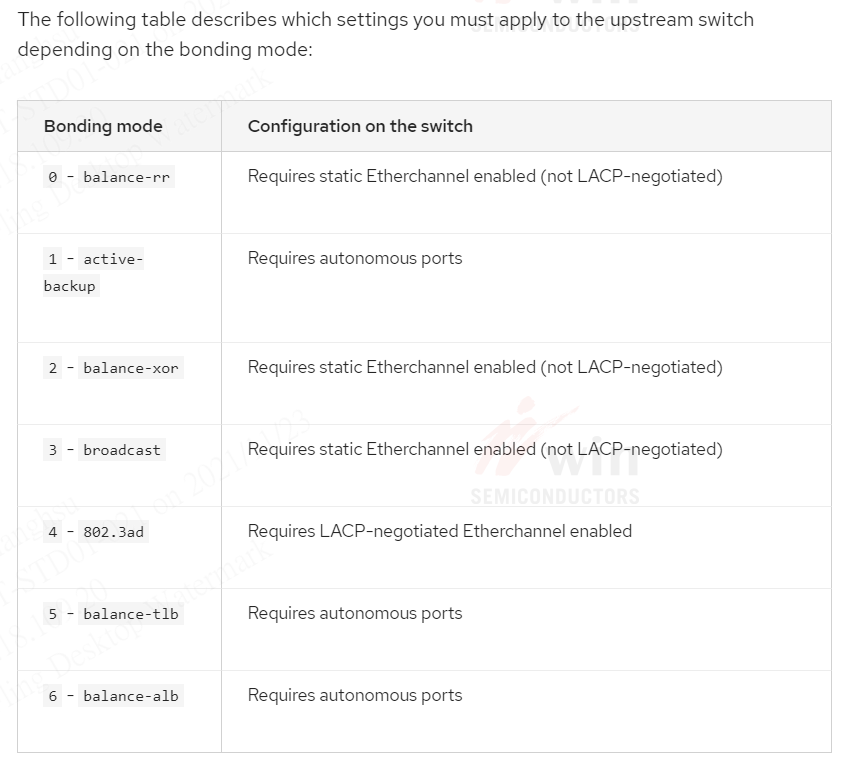
NOTE: 如果要使用預設的 Round-Robin 模式,網卡所連結的 Switch 設備必須設定 EtherChannel,否則 Switch 設備會偵測到 vlan XX is flapping between port YYY and port ZZZ。
重啟網路服務
# 注意:如果有使用 iSCSI Disks,重啟網路服務可能造成系統其他問題
systemctl restart network.service
or
nmcli networking off; modprobe -r bonding ; nmcli networking on
LACP Mode
RedHat 7/8
nmtui > Edit a connection > Bond: bond0 > Edit >
- Mode: 802.3ad
Verify the state of the network
[root@tpeitptsm01 ~]# cat /proc/net/bonding/bond0
Ethernet Channel Bonding Driver: v3.7.1 (April 27, 2011)

Bonding Mode: IEEE 802.3ad Dynamic link aggregation
Transmit Hash Policy: layer2 (0)
MII Status: up
MII Polling Interval (ms): 100
Up Delay (ms): 0
Down Delay (ms): 0
Peer Notification Delay (ms): 0

802.3ad info
LACP rate: slow
Min links: 0
Aggregator selection policy (ad_select): stable
System priority: 65535
System MAC address: b4:7a:f1:4c:8b:1c
Active Aggregator Info:
        Aggregator ID: 1
        Number of ports: 4
        Actor Key: 9
        Partner Key: 3
        Partner Mac Address: 70:18:a7:dc:ac:80

Slave Interface: eno1
MII Status: up
Speed: 1000 Mbps
Duplex: full
Link Failure Count: 0
Permanent HW addr: b4:7a:f1:4c:8b:1c
Slave queue ID: 0
Aggregator ID: 1
Actor Churn State: none
Partner Churn State: none
Actor Churned Count: 0
Partner Churned Count: 0
details actor lacp pdu:
    system priority: 65535
    system mac address: b4:7a:f1:4c:8b:1c
    port key: 9
    port priority: 255
    port number: 1
    port state: 61
details partner lacp pdu:
    system priority: 32768
    system mac address: 70:18:a7:dc:ac:80
    oper key: 3
    port priority: 32768
    port number: 263
    port state: 61

Slave Interface: eno2
MII Status: up
Speed: 1000 Mbps
Duplex: full
Link Failure Count: 0
Permanent HW addr: b4:7a:f1:4c:8b:1d
Slave queue ID: 0
Aggregator ID: 1
Actor Churn State: none
Partner Churn State: none
Actor Churned Count: 0
Partner Churned Count: 0
details actor lacp pdu:
    system priority: 65535
    system mac address: b4:7a:f1:4c:8b:1c
    port key: 9
    port priority: 255
    port number: 2
    port state: 61
details partner lacp pdu:
    system priority: 32768
    system mac address: 70:18:a7:dc:ac:80
    oper key: 3
    port priority: 32768
    port number: 264
    port state: 61
Configuration on the switch