
RedHat Subscription Manager
Tutorials
Unregistered Subscription Manager
# yum repolist
Updating Subscription Management repositories.

This system is registered to Red Hat Subscription Management, but is not receiving updates. You can use subscription-manager to assign subscriptions.
NOTE: 在 /etc/yum.repos.d/ 目錄裡,如果曾經有手動設定其它的 repository,請先移除,或者將它們 Disable。
Sign up an account
RedHat 訂閱帳號有分付費版與免費版兩種。
付費版)
- 入口網站: https://access.redhat.com/
- 依據主機數量每年購買訂閱數。
免費版)
- Developer 帳號申請: https://developers.redhat.com/
- 入口網站: https://access.redhat.com/
- 需每年手動續約。
- 一個 Developer 帳號可用於一個組織,主機數量限制在 16 以下。
- 組織規模若不是大型企業,可用於 production 主機。
- 沒有任何技術支援,也不能開 ticket。
- 可以透過 RHN 作線上更新(這與付費版相同)。
- 官方連結
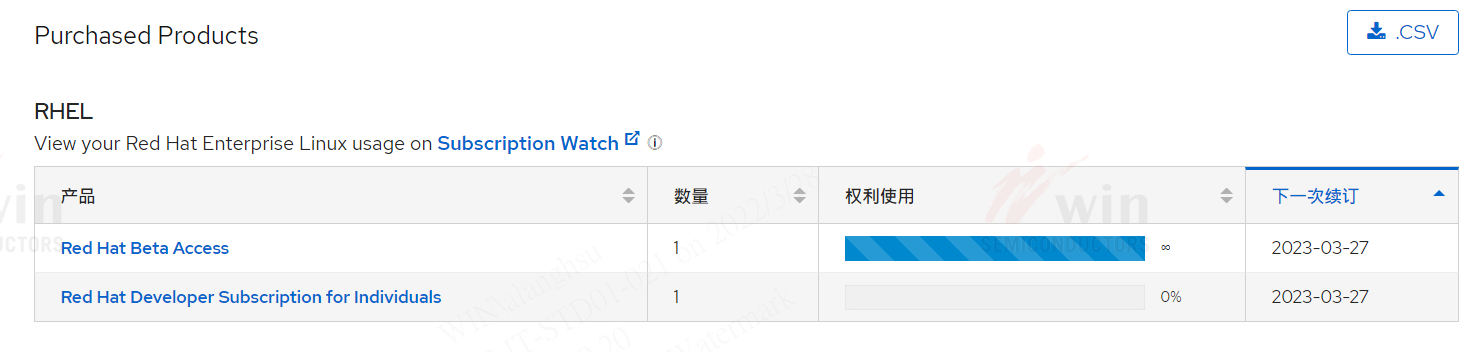
申請 Developer 帳號後,在訂閱頁面會有兩個產品,主要是第二項 Red Hat Developer Subscription for Individuals,有了這個,RedHat 主機就可以像付費版那樣作線上更新。
Configure HTTP Proxy (optional)
One-liner Command
subscription-manager config --server.proxy_hostname=proxy.example.com --server.proxy_port=8080 --server.proxy_user=admin --server.proxy_password=secretAlternatively, proxy information can be added into configuration
/etc/rhsm/rhsm.conf:
# an http proxy server to use
proxy_hostname =

# port for http proxy server
proxy_port =

# user name for authenticating to an http proxy, if needed
proxy_user =

# password for basic http proxy auth, if needed
proxy_password =
Testing the connectivity to RHN
Without Proxy
curl -v https://subscription.rhn.redhat.com/subscription/ --cacert /etc/rhsm/ca/redhat-uep.pemWith Proxy
curl -v --proxy-user user:password --proxy proxy.example.com:8080 https://subscription.rhn.redhat.com/subscription/ --cacert /etc/rhsm/ca/redhat-uep.pem

curl -v --proxy-user user:password --proxy proxy.example.com:8080 https://subscription.rhsm.redhat.com/ --cacert /etc/rhsm/ca/redhat-uep.pem

curl -v --proxy-user user:password --proxy proxy.example.com:8080 https://cdn.redhat.com/ --cacert /etc/rhsm/ca/redhat-uep.pem
* Trying 10.14.25.128...
* TCP_NODELAY set
* Connected to tpemispr01.winfoundry.com (10.14.25.128) port 8080 (#0)
* allocate connect buffer!
* Establish HTTP proxy tunnel to subscription.rhn.redhat.com:443
> CONNECT subscription.rhn.redhat.com:443 HTTP/1.1
> Host: subscription.rhn.redhat.com:443
> User-Agent: curl/7.61.1
> Proxy-Connection: Keep-Alive
>
< HTTP/1.1 200 Connection established
<
* Proxy replied 200 to CONNECT request
* CONNECT phase completed!
* ALPN, offering h2
* ALPN, offering http/1.1
* successfully set certificate verify locations:
* CAfile: /etc/rhsm/ca/redhat-uep.pem
CApath: none
* TLSv1.3 (OUT), TLS handshake, Client hello (1):
* CONNECT phase completed!
* CONNECT phase completed!
* TLSv1.3 (IN), TLS handshake, Server hello (2):
* TLSv1.2 (IN), TLS handshake, Certificate (11):
* TLSv1.2 (IN), TLS handshake, Server key exchange (12):
* TLSv1.2 (IN), TLS handshake, Request CERT (13):
* TLSv1.2 (IN), TLS handshake, Server finished (14):
* TLSv1.2 (OUT), TLS handshake, Certificate (11):
* TLSv1.2 (OUT), TLS handshake, Client key exchange (16):
* TLSv1.2 (OUT), TLS change cipher, Change cipher spec (1):
* TLSv1.2 (OUT), TLS handshake, Finished (20):
* TLSv1.2 (IN), TLS handshake, Finished (20):
* SSL connection using TLSv1.2 / ECDHE-RSA-AES256-GCM-SHA384
* ALPN, server accepted to use http/1.1
* Server certificate:
* subject: C=US; ST=North Carolina; O=Red Hat, Inc.; OU=Red Hat Subscription Management; CN=subscription.rhsm.redhat.com; emailAddress=ca-support@redhat.com
* start date: May 7 00:43:39 2020 GMT
* expire date: May 7 00:43:39 2023 GMT
* issuer: C=US; ST=North Carolina; O=Red Hat, Inc.; OU=Red Hat Network; CN=Red Hat Entitlement Operations Authority; emailAddress=ca-support@redhat.com
* SSL certificate verify ok.
> GET /subscription/ HTTP/1.1
> Host: subscription.rhn.redhat.com
> User-Agent: curl/7.61.1
> Accept: */*
>
< HTTP/1.1 200 OK
< Server: openresty/1.19.9.1
< Date: Wed, 16 Feb 2022 06:26:59 GMT
< Content-Type: application/json
< Transfer-Encoding: chunked
< Connection: keep-alive
< x-candlepin-request-uuid: 616ae5b2-53a2-4e9d-816e-b359545c4805
< X-Version: 3.2.22-1
<
[{"rel":"consumertypes","href":"/consumertypes"},{"rel":"distributor_versions","href":"/distributor_versions"},{"rel":"","href":"/"},{"rel":"admin","href":"/admin"},{"rel":"content","href":"/content"},{"rel":"cdn","href":"/cdn"},{"rel":"jobs","href":"/jobs"},{"rel":"crl","href":"/crl"},{"rel":"deleted_consumers","href":"/deleted_consumers"},{"rel":"rules","href":"/rules"},{"rel":"products","href":"/products"},{"rel":"roles","href":"/roles"},{"rel":"subscriptions","href":"/subscriptions"},{"rel":"activation_keys","href":"/activation_keys"},{"rel":"status","href":"/status"},{"rel":"consumers","href":"/consumers"},{"rel":"content_overrides","href":"/consumers/{consumer_uuid}/content_overrides"},{"rel":"users","href":"/users"},{"rel":"hypervisors","href":"/hypervisors"},{"rel":"guestids","href":"/consumers/{consumer_uuid}/guestids"},{"rel":"entitlements","href":"/entitlements"},{"rel":"owners","href":"/owners"},{"rel":"pools","href":"/pools"},{"rel":"serials","href":"/serials"},{"rel":"packages", "href":"/consume* Connection #0 to host tpemispr01.winfoundry.com left intactRegister to RHN
subscription-manager remove --all
subscription-manager unregister
subscription-manager clean
yum clean all
rm -rf /var/cache/yum/*

# Option#1:  With the credentials
subscription-manager register --username myname --password 'ThisPassword'
# Option#2: With an Activation Key
# Create a key from the url https://access.redhat.com/management/activation_keys
subscription-manager register --org=<ORG-ID> --activationkey=<NAME>
[~]# yum clean all
Updating Subscription Management repositories.
Unable to read consumer identity
This system is not registered with an entitlement server. You can use subscription-manager to register.
17 files removed
[~]# subscription-manager register --username myuser --password 'mypassword'
Registering to: subscription.rhsm.redhat.com:443/subscription
The system has been registered with ID: 36e3da57-5896-488e-ab8e-9f95a48c9f8c
The registered system name is: haproxy.winfoundry.com
[~]# yum repolist
Updating Subscription Management repositories.
This system is registered with an entitlement server, but is not receiving updates. You can use subscription-manager to assign subscriptions.
[~]# subscription-manager attach --auto
Installed Product Current Status:
Product Name: Red Hat Enterprise Linux for x86_64
Status: Subscribed
[~]# yum repolist
Updating Subscription Management repositories.
repo id                                                   repo name
rhel-8-for-x86_64-appstream-rpms                          Red Hat Enterprise Linux 8 for x86_64 - AppStream (RPMs)
rhel-8-for-x86_64-baseos-rpms Red Hat Enterprise Linux 8 for x86_64 - BaseOS (RPMs)Registered Subscription Manager
[~]# yum repolist
Updating Subscription Management repositories.
repo id repo name
rhel-8-for-x86_64-appstream-rpms Red Hat Enterprise Linux 8 for x86_64 - AppStream (RPMs)
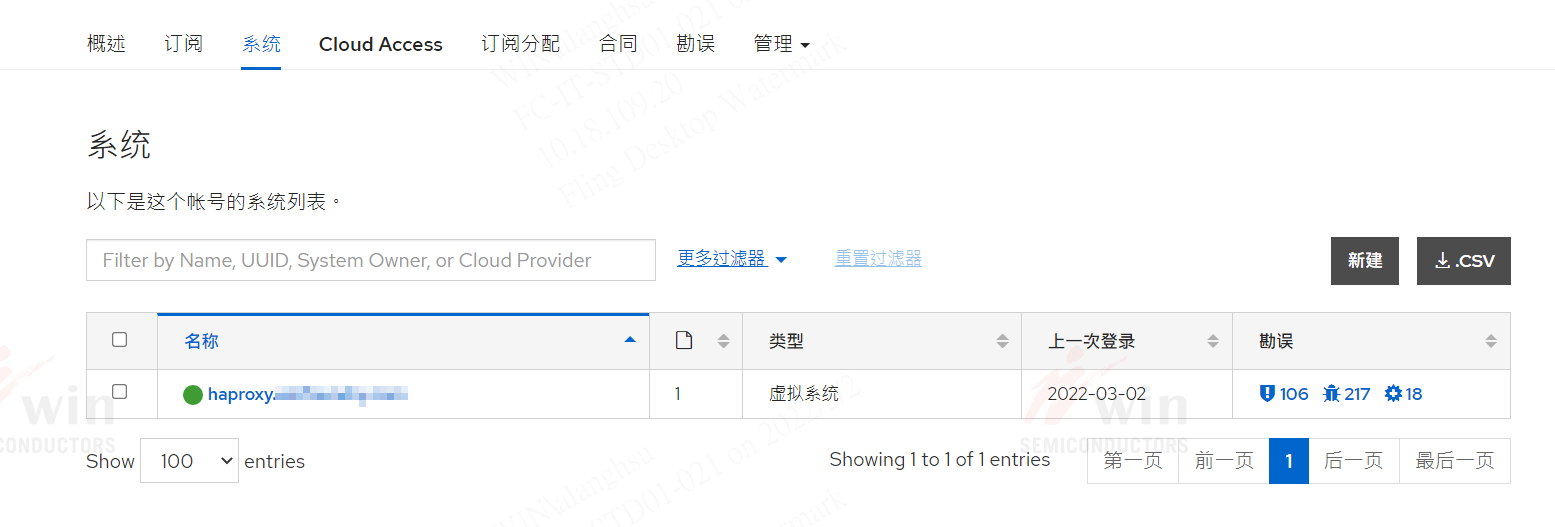
rhel-8-for-x86_64-baseos-rpms Red Hat Enterprise Linux 8 for x86_64 - BaseOS (RPMs)登入 https://access.redhat.com/,在系統清單會顯示主機名稱。
Verifying Subscription
[root@haproxy ~]# subscription-manager list
+-------------------------------------------+
    Installed Product Status
+-------------------------------------------+
Product Name:   Red Hat Enterprise Linux for x86_64
Product ID:     479
Version:        8.3
Arch:           x86_64
Status:         Subscribed
Status Details:
Starts:         03/02/2022
Ends:           03/02/2023


[root@haproxy ~]# yum repolist enabled
Updating Subscription Management repositories.
repo id                                                   repo name
rhel-8-for-x86_64-appstream-rpms                          Red Hat Enterprise Linux 8 for x86_64 - AppStream (RPMs)
rhel-8-for-x86_64-baseos-rpms                             Red Hat Enterprise Linux 8 for x86_64 - BaseOS (RPMs)
Removing from RHN
Remove all subscriptions,run:
# subscription-manager remove --all

1 local certificate has been deleted.
1 subscription removed at the server.
To unregister the system from the Red Hat, run:
# subscription-manager unregister

Unregistering from: subscription.rhsm.redhat.com:443/subscription
System has been unregistered.
To remove all local data from the system, run:
# subscription-manager clean
All local data removed
登入 https://access.redhat.com/ 在訂閱頁面的系統欄,原先註冊的主機名稱會自動移除。
Update System
yum updateFAQ
Registering to: subscription.rhsm.redhat.com:443/subscription
Network error, unable to connect to server. Please see /var/log/rhsm/rhsm.log for more information.
Solution: Check the firewall by following the instructions below.
subscription.rhn.redhat.com:443[https] ANDsubscription.rhsm.redhat.com:443[https] (This is the new default address in newer versions of RHEL 7)cdn.redhat.com:443[https]*.akamaiedge.net:443[https] OR*.akamaitechnologies.com:443[https]
It is not recommended to specify the IP addresses because the packages are distributed through the Akamai network and the IP addresses are subject to change. However, if your firewall is unable to use host name filtering, Red Hat provides a pool of IP addresses that should provide CDN delivery.
Q: subscription-manager attach --auto
Installed Product Current Status:
Product Name: Red Hat Enterprise Linux for x86_64
Status: Not Subscribed
Solution:
- 登入 https://access.redhat.com/,確定帳戶裡有可用的訂閱服務。
- 如果是免費版 RedHat Developer 帳號,在訂閱清單裡如果沒有看到 Red Hat Developer Subscription for Individuals 這一項,請先登入 https://developers.redhat.com/ 然後再確認一次。 注意: 免費版個人授權需要每年手動更新一次有效期。
- 執行
subscription-manager refresh
This system is registered to Red Hat Subscription Management, but is not receiving updates. You can use subscription-manager to assign subscriptions.
Solution:
subscription-manager attach --auto